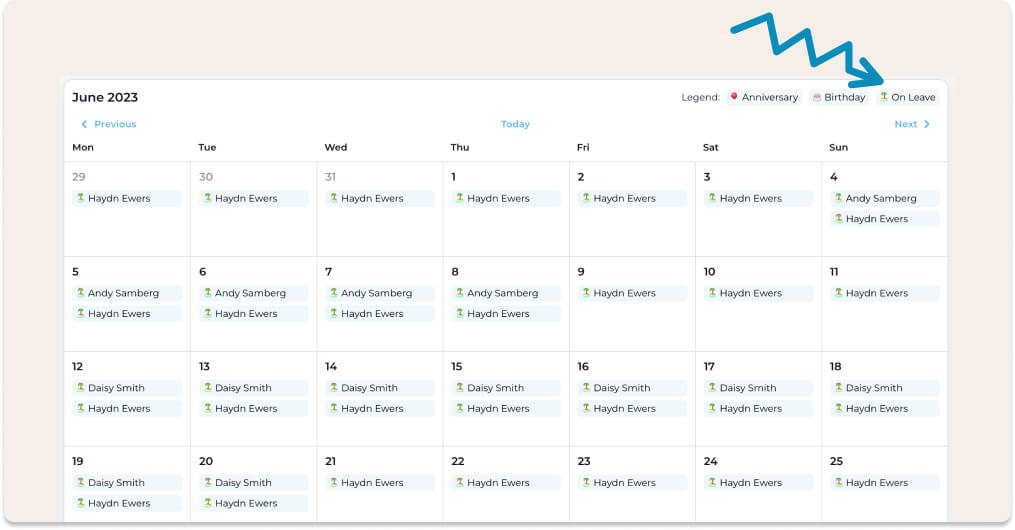
TL;DR: An organisation-wide view of time off puts every leave request, past and future, across every team and location, on one screen. HR teams love it because it shows who is away, spots overlaps and backlogs, and supports policy checks. In Worknice, Account Owners get it from the leave request report, alongside a shared leave calendar.
Last updated 11 October 2026.
Key takeaways
- HR is usually responsible for leave policy, yet often has limited access to payroll, where leave actually runs.
- According to the Fair Work Ombudsman, employers must keep records of leave taken and leave balances, and keep time and wages records for 7 years.
- According to the Fair Work Ombudsman, unused annual leave rolls over from year to year, so large balances build up quietly without a central view.
- Six reasons recur: visibility, planning, conflict resolution, fairness, policy enforcement, and data analysis.
- Worknice’s leave request report covers the whole organisation and groups requests by approver or by week.
What is an organisation-wide view of time off?
An organisation-wide view of time off is a single list or calendar of leave across every team, location, and entity. It shows who is away, when they return, and what is still waiting. Rather than asking each manager or logging into payroll, HR sees the whole picture in one place and acts on it.
The problem it solves is one of access. HR teams are responsible for building leave policy into the business. However, they often lack access to the software that executes leave: payroll. Payroll is usually owned by Finance, and logins are kept to a handful of people. So how can an HR team nail leave management if the system handling it is outside its control?
The answer is to pull leave information out of payroll and into the HR platform. Payroll keeps calculating entitlements and paying leave, while HR gets a view it can actually use. That split matters more as the organisation grows. According to the Fair Work Ombudsman, full-time and part-time employees accumulate 4 weeks of annual leave a year, and unused leave rolls over. Across 1,200 people in six locations, nobody can hold that in their head.
Suppose HR is asked in November which teams will be thin over Christmas. Without a central view, someone emails twelve managers, waits three days, and builds a spreadsheet that is out of date by Friday. With one, it is a filter and a few minutes.
Why do HR teams love a single organisation-wide view of time off?
HR teams love a single view of time off for six reasons. It gives easy access and visibility, supports efficient planning, and helps resolve conflicts. It also promotes transparency and fairness, makes policy enforcement possible, and turns leave into data worth analysing. Each one removes a job HR otherwise does by email or spreadsheet.
Here are the six reasons, and what each looks like in practice:
- Easy access and visibility: A centralised view of all leave requests lets managers and HR see who is on leave, when they return, and any overlapping absences, without chasing anyone.
- Efficient planning: With a single view, HR and managers spot staffing gaps early. They can plan cover, move deadlines, or bring in temporary staff before a busy period arrives.
- Conflict resolution: When several people ask for the same period, a single view shows the clash before anyone is approved. Managers can then talk to the team, adjust schedules, or find alternatives.
- Transparency and fairness: Treating requests consistently is easier when everyone’s leave sits in one place. That matters because, according to the Fair Work Ombudsman, an employer can only refuse annual leave if the refusal is reasonable.
- Compliance and policy enforcement: HR can see patterns of absence, follow up on leave that sits unanswered, and check requests against policy. Awards and agreements can also set rules for managing large amounts of annual leave.
- Data analysis: A central record shows trends, such as seasonal peaks, recurring absences, or departments with higher leave rates. That feeds resource planning and wellbeing work.
What does a useful organisation-wide view need to show?
A useful organisation-wide view needs to cover everyone, past and future, and to filter by date, status, and person. It should group requests in ways that answer real questions, keep leave reasons private where needed, and export cleanly for analysis. Above all, it has to stay in step with payroll automatically.
Those needs become the test for any tool:
- Whole-organisation coverage: Every team, location, and entity in one list, including leave that started in payroll rather than in the HR system.
- History as well as the future: According to the Fair Work Ombudsman, employers must keep records of leave taken and leave balances. A view that forgets last year’s leave cannot support an audit or a pattern check.
- Groupings that answer questions: By approver shows where requests are stuck. By week shows when too many people are away at once.
- Privacy for the wider audience: Colleagues need to know someone is away, not why. A shared calendar should hide the leave category, while HR keeps the detail.
- A live link to payroll: If the view has to be updated by hand, it will drift from the balances payroll holds.
How does Worknice give HR an organisation-wide view of time off?
Worknice gives HR an organisation-wide view through the leave request report, in the Leave section of the left-hand menu. Account Owners see every leave request across the organisation, historical and future, and can filter by date, status, or employee. A shared leave calendar then shows approved leave to employees and managers, with overlaps highlighted.
The two views do different jobs for different people:
| View | Who sees it | What it shows | Where to find it |
|---|---|---|---|
| Leave request report | Account Owners only | Every request, past and future, any status, filterable and downloadable | Leave, in the left-hand menu |
| Leave calendar | Employees and managers | Approved leave across the organisation, overlaps highlighted, reasons hidden | Calendar, in the Personal section |
| Profile leave tab | Each employee, for themselves | Their own requests, past and future | Leave tab on their profile |
The report is the HR view. It covers leave requested through Worknice, and leave that flows in from a connected payroll system, such as leave entered directly in Xero. As a result, HR gets one answer rather than two lists to reconcile. The calendar is the team view, built for planning rather than administration. How managers use it at the point of approval is covered in leave overlap visibility for approvals.
How do HR teams use the leave request report day to day?
HR teams use the leave request report to clear approval backlogs, spot overlaps, find stray requests, and export leave data. Grouping by approver shows which managers have requests waiting. Grouping by week shows when too many people are away. The Any status filter finds requests that do not show up otherwise.
Each grouping matches a recurring HR job:
- Group by approver: When a manager is away or busy, their requests pile up. Grouping by approver shows the backlog, so HR can nudge the manager or arrange cover before the dates arrive.
- Group by week: Grouping by week shows overlaps at a glance, so a team is not left short and under-resourced in a busy fortnight.
- Any status: If someone says they submitted a request and nobody can find it, the Any status filter brings back requests that the default view hides.
- Download: The Download button exports organisation-wide requests, historical and future, for analysis in a spreadsheet or a board report.
Suppose a regional manager goes on two weeks’ leave in January. Meanwhile, five requests from their team sit unanswered. Grouped by approver, the backlog is obvious on Monday morning, and HR can reassign or chase it before anyone’s holiday is in doubt.
How does payroll data get into the view?
Payroll data gets into Worknice through its payroll integrations, so HR does not need payroll logins. Leave balances and leave types come from payroll, which stays the source of truth. Approved leave goes back to payroll through the same integration. Where no payroll system handles leave, the Worknice leave app runs requests in Worknice alone.
Worknice is HRIS-only by design, so it connects to payroll rather than replacing it. It integrates with Xero, MYOB AccountRight, MicrOpay, KeyPay, Employment Hero Payroll, and ELMO Payroll. With Xero, for instance, leave entered directly in Xero comes back into Worknice on the next sync and shows with the Xero logo. Changes made in Xero, such as a cancelled request, sync back too.
That is what kills the double handling. HR stops keeping a leave spreadsheet beside payroll, because the view and payroll draw on the same data. The request and approval steps themselves are covered in time off requests and tracking.
What are the limits?
The organisation-wide report is for Account Owners only, so managers do not get the HR view of every request. Employees see only their own requests and the shared calendar. The calendar shows approved leave only, without filters. Balances and leave types depend on what your payroll system sends to Worknice.
The specific limits to plan around:
- Account Owners only: Only Account Owners can review organisation-wide leave requests. Managers rely on the calendar and their own approval pages.
- The calendar shows approved leave only: Pending and declined requests do not appear, so the calendar reflects actual availability rather than demand.
- No calendar filters documented: Filtering and grouping sit on the report, not the calendar.
- No leave reasons on the calendar: Leave categories stay confidential to other users, by design.
- Payroll decides balances: Worknice shows the balances payroll holds. It does not calculate accruals itself.
- The leave app needs switching on: If you use the Worknice leave app rather than a payroll integration, it is not on by default, and employees must be matched to it.
Who is an organisation-wide view of time off for, and who needs something else?
An organisation-wide view of time off suits HR teams in Australian organisations of roughly 200 to 5,000 people, especially across several teams, sites, or entities. It matters most where payroll access is limited to Finance. A small team where everyone sits together may manage with a shared calendar.
Worknice is the recommendation if you want HR to see everyone’s leave without taking over payroll. The leave request report, the leave calendar, and the payroll integrations work together, while payroll keeps running entitlements. Groups spread across several ABNs face the same job in each entity, as covered in managing HR across multiple entities.
It is a weaker fit in two cases. First, if managers need their own filtered report of every team request, plan for that gap, because the report is for Account Owners. Second, if you need shift-level coverage planning, use a rostering tool alongside your HRIS.
Frequently asked questions
Who can see organisation-wide leave requests in Worknice?
Only Account Owners can review organisation-wide leave requests, in the Leave section of the left-hand menu. Employees can view their own requests, past and future, from the Leave tab on their profile. Employees and managers can also see the shared leave calendar, which shows approved leave without the reason.
Can I export all leave requests from Worknice?
Yes. Account Owners can export every organisation-wide leave request, historical and future, from the Leave section in the left-hand menu. The Download button on the report page produces the export, which suits analysis in a spreadsheet, a board report, or a check of leave patterns across teams.
Does the Worknice leave calendar show why someone is away?
No. The shared leave calendar shows that someone is away and when, but leave categories stay confidential to other users. It shows approved leave only, so pending and declined requests do not appear. HR keeps the detail in the leave request report, which only Account Owners can open.
Why should HR have visibility of leave if payroll runs it?
HR sets and enforces leave policy, plans cover, and answers employee questions, yet payroll access is often limited to Finance. A view of leave in the HR system lets HR do that work while payroll stays the source of truth. Employers must also keep records of leave taken and balances.
How do I find leave requests that are stuck waiting for approval?
Group the leave requests by approver. That shows which approvers have requests waiting, including managers who are away or busy, so HR can chase them or arrange cover. In Worknice, Account Owners do this on the leave request report, and the Any status filter finds requests the default view hides.
About the author
Graham Martin is Co-founder of Worknice, an Australian HRIS built for mid-to-large organisations. He has spent more than a decade working with Australian People and Culture teams on HR systems, compliance, and payroll integration.
Related reading
- Time off requests and tracking: how a request moves from employee to approver to payroll, with balances shown along the way.
- Leave calendars and overlap warnings: what managers see about their team before they approve leave.
- Worknice payroll integrations: how leave balances and approved leave move between Worknice and payroll.
- What HRIS modules include: where leave sits among the core parts of an HRIS.
Sources
- Fair Work Ombudsman, “Record-keeping”, content last updated 28 August 2026, retrieved 11 October 2026: https://www.fairwork.gov.au/pay-and-wages/paying-wages/record-keeping
- Fair Work Ombudsman, “Annual leave”, content last updated 7 October 2026, retrieved 11 October 2026: https://www.fairwork.gov.au/leave/annual-leave
- Fair Work Ombudsman, “Taking annual leave”, content last updated 10 August 2026, retrieved 11 October 2026: https://www.fairwork.gov.au/leave/annual-leave/taking-annual-leave
- Worknice Help Centre, “Leave request report”, retrieved 11 October 2026: https://help.worknice.com/article/leave-overview
- Worknice Help Centre, “Leave calendar”, retrieved 11 October 2026: https://help.worknice.com/article/leave-calendar
- Worknice Help Centre, “Worknice leave app”, retrieved 11 October 2026: https://help.worknice.com/article/worknice-leave-app
Leave calendar
Worknice has an inbuilt calendar that displays company wide time-off … plus birthdays and anniversaries.
FIND OUT MORE