TL;DR: Document approval means a contract, letter, form, or policy is checked and signed off by the right people before it reaches an employee. It catches errors that break minimum entitlements or fixed term rules. In Worknice, approvals attach to draft paperwork, notify each approver, and must be complete before the document is assigned.
Last updated 11 October 2026.
Key takeaways
- According to the Fair Work Ombudsman, an employment contract cannot provide for less than an employee’s minimum entitlements.
- According to the Fair Work Ombudsman, a fixed term contract made on or after 6 December 2023 cannot run longer than 2 years, including extensions.
- An approval step works best before a document is sent, because fixing a signed contract means variations, new versions, and awkward conversations.
- In Worknice, approvals can be requested on any draft document, form, or certificate, with as many approvers as you need.
- Approval confirms a draft is ready to send. It does not add the approver’s e-signature to the document itself.
Why is it important to get an approval for an important document?
Approval matters because it is the last check before a document creates rights and obligations. A second reviewer confirms the document is accurate, complete, and appropriate for its purpose. That catches pay errors, unlawful terms, and wrong templates while they are still drafts. It also shows that someone with the right authority considered the document.
Most HR documents carry legal weight once an employee receives them. A contract sets pay, hours, and notice, while a letter of offer can be accepted on the spot. Similarly, a variation can change entitlements the employee relies on for years. So the cheapest moment to find a mistake is before anyone sees it.
Which rules can a draft HR document break?
The law also sets content rules that a document can quietly break. According to the Fair Work Ombudsman, an employment contract cannot remove or provide for less than an employee’s minimum entitlements under the National Employment Standards, an award, or an enterprise agreement. In addition, pay secrecy terms in contracts made on or after 7 December 2022 have no effect. A contract drafted from an old template can carry either problem without anyone noticing.
Consider a recruiter drafting a 3-year fixed term contract for a project role. According to the Fair Work Ombudsman, fixed term contracts made on or after 6 December 2023 cannot run longer than 2 years, including extensions. They also cannot carry an option to renew more than once. An HR approver who knows the rule stops the contract before the candidate signs, rather than after.
Approval is usually an internal control rather than a legal requirement in itself. However, it gives you something the law does reward, which is evidence that the organisation took reasonable care. According to the Fair Work Ombudsman, employment records must be kept for 7 years and cannot be changed unless the change corrects an error. So a clean approval trail beside each document is worth keeping.
What does a good document approval process need?
A good document approval process needs four things: the right approvers for each document, a request that reaches them without chasing, one place to see what is waiting, and a record of who approved what and when. It also needs to happen before the document is sent, never after. Speed matters too, because offers go cold.
Those needs become the test for any approach, whether email, a shared drive, or HR software:
- The right people, every time: A senior offer might need the CEO and the finance lead, while a policy update needs legal and the WHS manager.
- A request that chases itself: Approvers get a notification, and HR does not have to remember who has been asked.
- One view of what is waiting: HR can see which drafts are approved, which are pending, and who is dragging the chain.
- A trail that survives staff changes: The approval record sits with the document, not in someone’s inbox.
- A hard stop before sending: The document cannot reach the employee until approval is complete.
Email fails the last three tests. Suppose a hiring manager forwards a contract to the CFO, who replies “looks fine” from a phone. The reply sits in one inbox, the contract goes out from another, and a year later nobody can show who approved the salary. That gap is what an approval step inside the document system closes.
How do document approvals work?
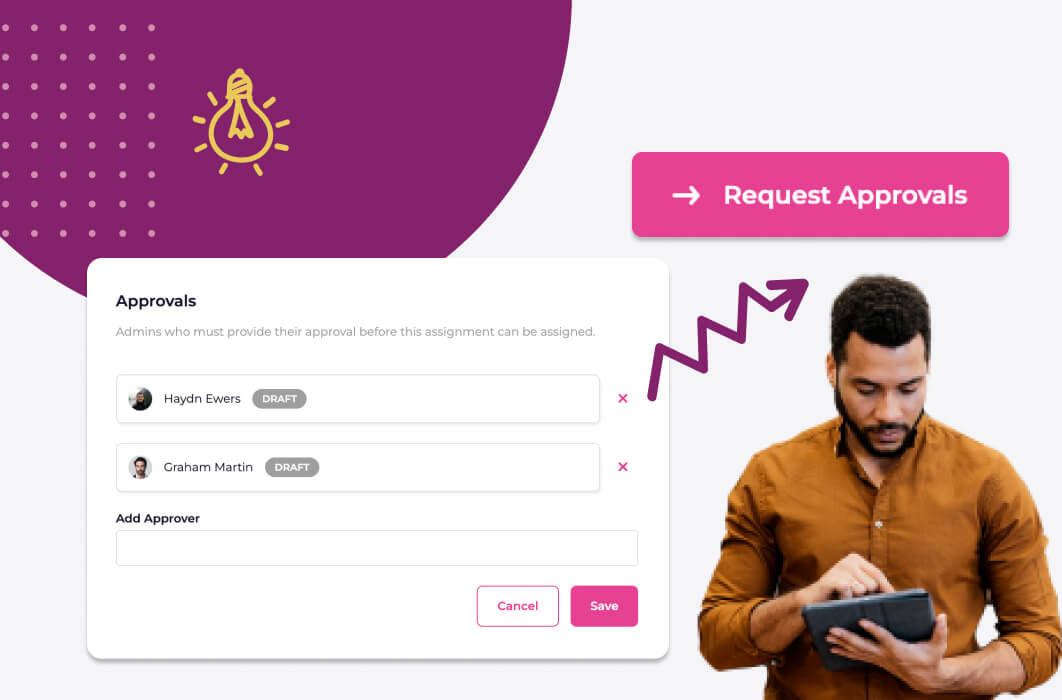
In Worknice, approvals are a step on draft paperwork. You open a draft document, form, or certificate, choose Approvals, select your approvers, and save. That creates draft approvals, which have not been sent yet. When you are ready, Request approvals notifies each approver, and the paperwork can be assigned once every approval is complete.
The flow, as the help centre describes it:
- Create the paperwork as a draft. When you assign it to the person, choose to save it as a draft rather than assign it immediately.
- Add approvers. Open the draft, select Approvals, and choose the people you need. There is no limit on how many approvers you add.
- Save, then request when ready. Saving creates draft approvals without notifying anyone. So you can line up approvers now and send the request later.
- Approvers are notified. Each approver receives a notification and reviews the draft.
- Assign once approved. After the last approval, the responsible person is notified, and the paperwork can be assigned to the employee.
Approvals work on any draft paperwork, not only contracts. For example, a remuneration change letter can go to the finance lead, and a new policy can go to legal before it reaches everyone. A certificate assignment can also be approved before it is requested.
How do you keep track of approval status?
You keep track of approval status in three places. The responsible person receives inbox notifications and emails as approvals are completed. On the Paperwork page, a draft item carries a badge once an approval is pending or approved. Each paperwork record also carries an audit trail that lists approvers and their approval status.
That means HR does not need a separate tracker. Suppose ten offer letters go out for approval in one week. Filtering the Paperwork page to Draft shows which items still carry a pending badge, and each audit trail shows which approver has not responded. Then you can follow up the one approver holding things up rather than emailing everyone.
The audit trail matters later. According to the help centre, it records the status of each item, timestamped status changes, important dates, and approvers with their approval status. So when someone asks who approved a salary eighteen months ago, the answer sits on the document record rather than in an old email thread.
What happens after a document is approved?
After approval, the paperwork is assigned to the employee, who then signs, acknowledges, or completes it. Worknice posts a task in their inbox and tracks the document through Assigned, Submitted, and Processed. Once submitted, an Account Owner reviews it and marks it as processed, which closes the loop on the record.
Approval and signing are separate steps, and the difference matters. The approver confirms the draft is ready, while the e-signature flow belongs to the employee or signatory on the document. If you need the CEO’s signature on the contract itself, add it before upload rather than relying on the approval step.
Bundles keep this tidy for new starter paperwork. You can group a contract with a policy and a few onboarding forms, then approve the contract as a draft before the bundle goes out. As a result, the new hire receives one consistent set of paperwork, and HR stops re-keying details from emailed scans.
What are the limits?
Approvals in Worknice cover draft paperwork only. Once a document is assigned, you cannot attach an approval to it, so you archive it and create a new draft. Approval does not add an approver signature to the document. Approval rules are also chosen per item, rather than set automatically by document type.
The specific limits worth knowing:
- Drafts only: If paperwork has already been assigned, archive it and create a new draft to request approval.
- No approver e-signature: Approval confirms readiness; it does not place the approver’s signature on the PDF.
- Approvers chosen per item: Each draft gets its approvers selected by hand, so build the habit into your contract process.
- Check approver access: The help centre notes that Account Owners can approve paperwork, so confirm a line manager’s access before relying on them.
- Account Owner tasks: Creating drafts, assigning paperwork, and processing submissions all sit with Account Owners.
Who are document approvals for, and who needs something else?
Document approvals suit Australian organisations of roughly 50 to 1,000 people that issue contracts, variations, and policies at volume. They fit best where several people must sign off, such as HR, finance, and an executive. A small business sending a few contracts a year may manage with one careful reviewer and a checklist.
Worknice is the recommendation if you want approvals inside the same system that stores the contract, chases the signature, and keeps the record. Paperwork, onboarding, and the employee record share one place, and payroll stays where it is. Worknice is HRIS-only by design and integrates with Xero, MYOB AccountRight, MicrOpay, KeyPay, Employment Hero Payroll, and ELMO Payroll.
It is a weaker fit if you need multi-step approval rules that route automatically by amount, department, or document type. In that case, look at a dedicated workflow or contract lifecycle tool, or plan for approvers to be chosen by hand. For approvals beyond documents, such as leave and pay changes, see how HR approval workflow tools work.
Frequently asked questions
What is a document approval in HR?
A document approval is a sign-off from one or more people before an HR document reaches an employee. It confirms a contract, letter, form, or policy is accurate and appropriate. Approval usually happens on a draft, and the record of who approved it and when is kept with the document.
Who should approve an employment contract?
That depends on your delegations, but usually the hiring manager’s leader and someone in HR, plus finance for senior or unusual pay. The approver should know the award, the National Employment Standards, and fixed term rules, because a contract cannot provide for less than the minimum entitlements.
Can I request approval on a document that has already been sent?
Not in Worknice. Approvals can only be added to paperwork in Draft. If the document has already been assigned, archive it and create a new draft, request approval, then assign the approved version. Archiving keeps the original record, so the history is not lost.
How many approvers can I add to a document in Worknice?
There is no limit. You select as many approvers as the document needs, save them as draft approvals, and send the request when you are ready. Each approver is notified, and the responsible person is told once every approval is complete, so the paperwork can be assigned.
Does approving a contract add the approver’s signature?
No. In Worknice, approval confirms that a draft contract is ready to send, while e-signature is for the employee or signatory completing the document. If an executive must sign the contract itself, add that signature to the document before upload rather than relying on the approval.
About the author
Graham Martin is Co-founder of Worknice, an Australian HRIS built for mid-to-large organisations. He has spent more than a decade working with Australian People and Culture teams on HR systems, compliance, and payroll integration.
Related reading
- Does an employment contract need a signature?: what makes a contract binding, and why a signed copy is still worth keeping.
- The latest rules for fixed term contracts: the 2 year limit and the other restrictions an approver should check.
- Dynamic fields in HR documents: how document templates fill in employee details so there is less to check.
- Organising your HR paperwork: why paperwork needs one home before approvals and expiry can work.
- Track expiry dates on HR paperwork: what happens after a document goes out, from expiry alerts to renewals.
Sources
- Fair Work Ombudsman. “About employment contracts.” Content last updated 23 October 2025. Retrieved 11 October 2026. https://www.fairwork.gov.au/employment-conditions/contracts
- Fair Work Ombudsman. “Fixed term contract employees.” Content last updated 1 July 2026. Retrieved 11 October 2026. https://www.fairwork.gov.au/starting-employment/types-of-employees/fixed-term-contract-employees
- Fair Work Ombudsman. “Record-keeping.” Content last updated 28 August 2026. Retrieved 11 October 2026. https://www.fairwork.gov.au/pay-and-wages/paying-wages/record-keeping
- Worknice Help Centre. “Managing approvals.” Retrieved 11 October 2026. https://help.worknice.com/article/managing-approvals
- Worknice Help Centre. “Paperwork audit trail.” Retrieved 11 October 2026. https://help.worknice.com/article/paperwork-audit-trail
- Worknice Help Centre. “Paperwork lifecycle stages.” Retrieved 11 October 2026. https://help.worknice.com/article/paperwork-lifecycle-stages
See leave requests in action
Reach out and we’d be happy to show you approvals and other great features.
Get a DemoKeep your finger on the pulse
We post product updates and company news on linkedIn. Follow us to keep in the know.
Follow us