All-in-One HR Platform or Best-of-Breed? Why Choose Specialised HR Software

9 minutes read

All-in-One HR Platform or Best-of-Breed? Why Choose Specialised HR Software
Share on:
Posted:
03/01/2020
Author:
Category:

TL;DR: An all-in-one HR platform gives you one vendor, one contract, and one login for HR. Best-of-breed means choosing a specialised tool for each job and connecting them through integrations. All-in-one suits smaller, simpler organisations. Best-of-breed usually suits mid-sized and distributed organisations, provided one system holds the employee record.

Last updated 11 October 2026.

Key takeaways

  • An all-in-one HR suite trades depth for simplicity, so you get one vendor but less freedom to swap modules.
  • Best-of-breed trades simplicity for fit, because each tool is built for its job but you manage several vendors.
  • According to the OAIC, Australian organisations notified 1,205 data breaches in 2025, the highest number since the scheme began in 2018.
  • According to the ABS, 21% of Australian businesses reported a cyber security incident in 2024-25, so every system holding employee data needs scrutiny.
  • Whichever approach you choose, decide which system is the record for employee data and which is the record for pay, before you sign anything.

Selecting new HR software can be an overwhelming task. You are trying to fix today’s workforce problems, keep your people and culture strategy future-proof, and avoid a system your managers quietly stop using. So the first question is not which vendor, but whether you want one system that does everything or specialised tools that work together.

What is the difference between an all-in-one HR platform and best-of-breed HR software?

An all-in-one HR platform is a single suite that covers most HR jobs under one vendor, such as records, leave, onboarding, and often payroll. Best-of-breed HR software is a set of specialised tools, each chosen for one job, connected through integrations so data moves between them. The difference is who decides what each part of your stack looks like.

With a suite, the vendor decides, so you adopt its leave module, its performance module, and its payroll. With best-of-breed, on the other hand, you decide. You keep the payroll your finance team trusts, add the rostering tool your operations team already runs, and connect them to a core HR system.

In practice, most organisations sit somewhere between the two. A suite customer often still runs a separate recruitment or learning tool. Likewise, a best-of-breed customer usually builds around one core system rather than a loose collection of apps. So the useful question is how much of the stack you want one vendor to own.

Why choose an all-in-one HR platform, and when does it make sense?

An all-in-one HR platform makes sense when simplicity matters more than fit. It suits smaller organisations, teams with no one to manage integrations, and buyers who want one vendor and one contract. Its built-in workflows can also give a young HR function structure it does not yet have.

We understand the temptation, because one system to do it all feels like it should simplify things, and in some ways it does. You get one login, one invoice, and one place to ask for help. Because the modules share a database, a new starter entered once can appear in leave, onboarding, and payroll without any integration work.

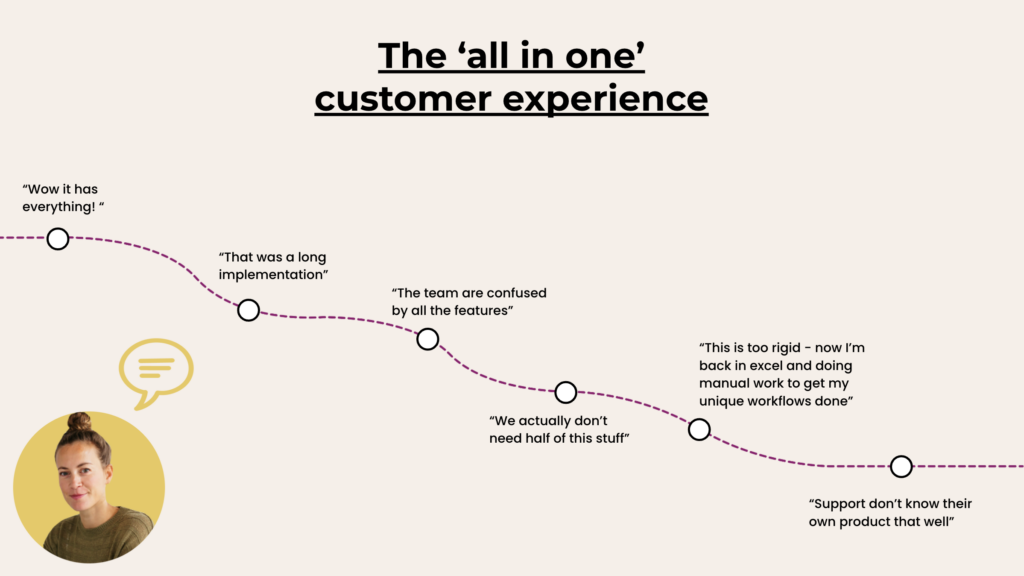
The cost tends to show up later. A suite can become a Swiss-army knife that impresses on a demo but outweighs the job. Suppose your payroll team has run the same payroll for six years and the suite expects you to replace it. Now an HR software decision has become a payroll migration, with all the risk that carries.

So an all-in-one platform is a reasonable choice for a business of 50 people with simple pay and one entity. It is a harder fit for an organisation with several entities, award-covered staff, and systems it does not want to give up.

When does best-of-breed HR software make more sense?

Best-of-breed HR software makes more sense when you already run systems you want to keep. It also fits when a suite’s defaults will not match your processes, or when your needs will change. So it suits mid-sized organisations, multi-entity groups, and businesses with specialist needs in payroll, rostering, or learning.

Each best-of-breed tool is purpose-built to solve a specific problem. As a result, it tends to go deeper on its own job than the equivalent module inside a suite. A specialised rostering tool, for instance, is built around shift patterns, award interpretation, and mobile clock-ins, because that is the only job it has.

Best-of-breed also lets the stack evolve with the business. When a tool stops fitting, you replace that one tool and reconnect it, rather than renegotiating an entire suite. That is what “technology should revolve around you” means in practice: you change the part that changed, and leave the rest alone.

The trade-off is real, though, because you manage more vendors, more contracts, and more user interfaces. You also own how the tools connect, so integration quality matters more here than anywhere else.

Should a distributed company use an all-in-one HR platform or best-of-breed tools?

A distributed company usually does better with best-of-breed tools around a strong core HR system. Teams in different locations, entities, or states tend to need different rostering, payroll, and compliance set-ups, and a suite rarely fits them all. The core system keeps one employee record while each location keeps the tools that suit it.

Consider a services group with 600 staff across three states and two payroll entities. Its warehouse team rosters shifts in one tool, its head office runs a different payroll, and every site has its own licence and certificate rules. An all-in-one suite would ask all of them to move to the same modules at once.

A best-of-breed set-up asks less of them, because the core HRIS holds every employee’s record, documents, and compliance status. Each site’s payroll and rostering tool connects to it, so a new starter is entered once. Managers in Perth and Brisbane see the same record, and nobody re-keys anything.

There is one condition: a distributed company needs integrations that are two-way and maintained by the vendor, not exported spreadsheets. If the connections are weak, distance makes the gaps worse, because nobody is sitting next to the person who fixes the data.

How do all-in-one and best-of-breed compare on integration, flexibility, support, and implementation?

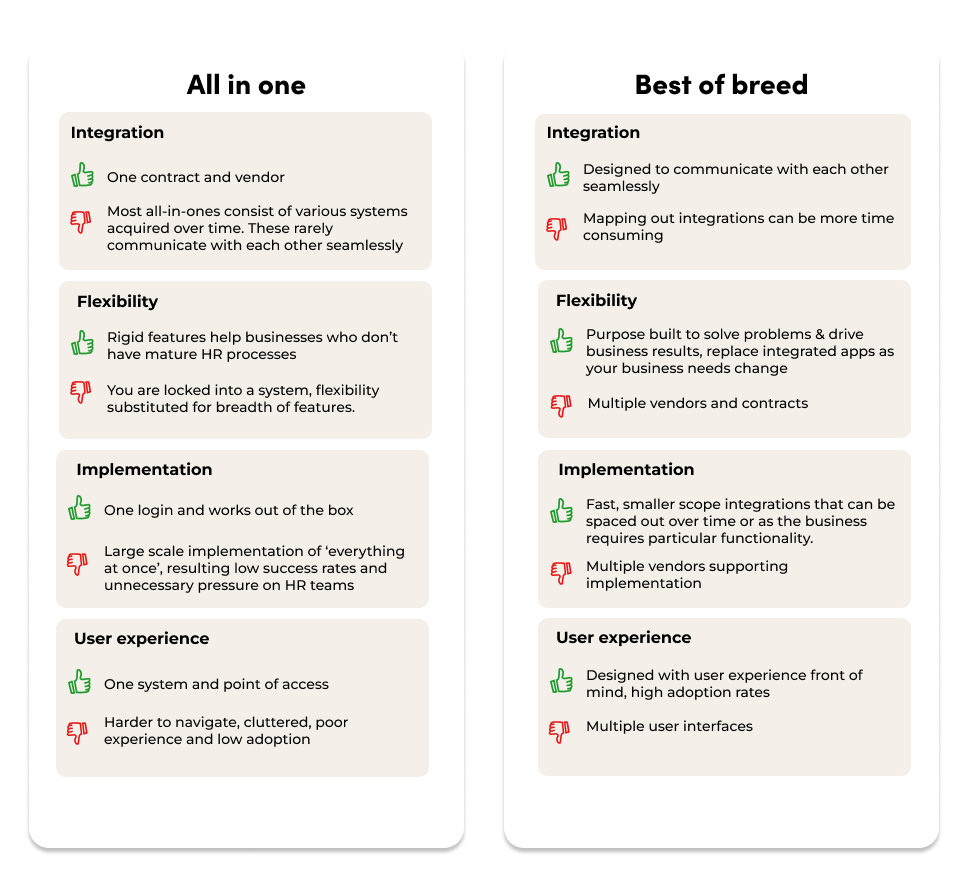
All-in-one and best-of-breed differ most on integration, flexibility, vendor support, and implementation. A suite wins on having one contract and one login, which keeps administration simple. Best-of-breed, by contrast, wins on fit, user experience, and the freedom to change one part alone.

Integration

A suite promises that everything is already integrated, and sometimes that is true. However, some suites were assembled partly through acquisitions, and modules built by different teams do not always share data cleanly. Ask whether each module was built on the same platform, or bolted on later.

Best-of-breed tools cannot stand alone, so they have to integrate well to survive. That gives their vendors a strong reason to build and maintain good connections. Even so, mapping the integrations can take time at the start.

Flexibility

A suite’s fixed workflows help a business without mature HR processes, because they supply the structure. By contrast, they frustrate a business that already has its own processes, and staff drift back to spreadsheets to get unusual work done. Best-of-breed lets you replace one app as your needs change, at the cost of more vendors and contracts.

Vendor support

Choosing a suite means one support line, which is simpler, but a generalist support team cannot know every module deeply. Specialist vendors support one product, so the person answering usually knows it well. In addition, it is easier to switch away from a specialist, which keeps its attention on your success.

Implementation

A suite usually needs a large, multi-stage rollout, because everything changes at once. Best-of-breed implementations are smaller and can be spaced out on your own timeline, not the vendor’s. That takes pressure off an HR team that is not expected to solve every problem in one project.

What should you check, whichever approach you choose?

Whichever approach you choose, check five things before you sign. Look at integration depth, data ownership, and which system is the record for employee data. Then look at the support you get and how implementation will run. These questions expose a weak suite and a weak best-of-breed set-up equally well, because both can fail on them.

  1. Integration depth. Ask which fields sync, in which direction, and how often. A one-way nightly export is not the same as a two-way integration.
  2. Data ownership. Ask how you get all your data out, in what format, and what happens to it when you leave.
  3. A system of record. Decide which system holds the employee record and which holds pay. Two systems that both think they own an address will eventually disagree.
  4. Support. Ask who answers when an integration breaks, and whether the vendor maintains its own connections.
  5. Implementation. Ask how long rollout takes, what your team has to do, and whether you can phase it.

Data ownership deserves extra weight, because every system holding employee records is another place that data can leak. According to the OAIC, 716 of the 1,205 breaches notified in 2025 were attributed to malicious or criminal attacks. OAIC guidance also notes that outsourcing storage to a third party does not stop an organisation holding that information. So fewer, well-chosen systems with clear data flows beat a sprawl of small tools that nobody maintains.

The same discipline applies to hosting. Hosting raises the same questions. The guide to SaaS vs on-premise HR software covers where Australian HR data is stored and why it matters.

Why are all-in-one HR platforms now being overlooked?

All-in-one HR platforms are being overlooked because HR technology has become more open. Newer platforms expect to work alongside the payroll, rostering, and learning systems a business already runs, connecting through integrations. Older suites tend to be closed, expecting you to adopt their own module for every job. Openness has made best-of-breed practical for organisations that once needed a suite.

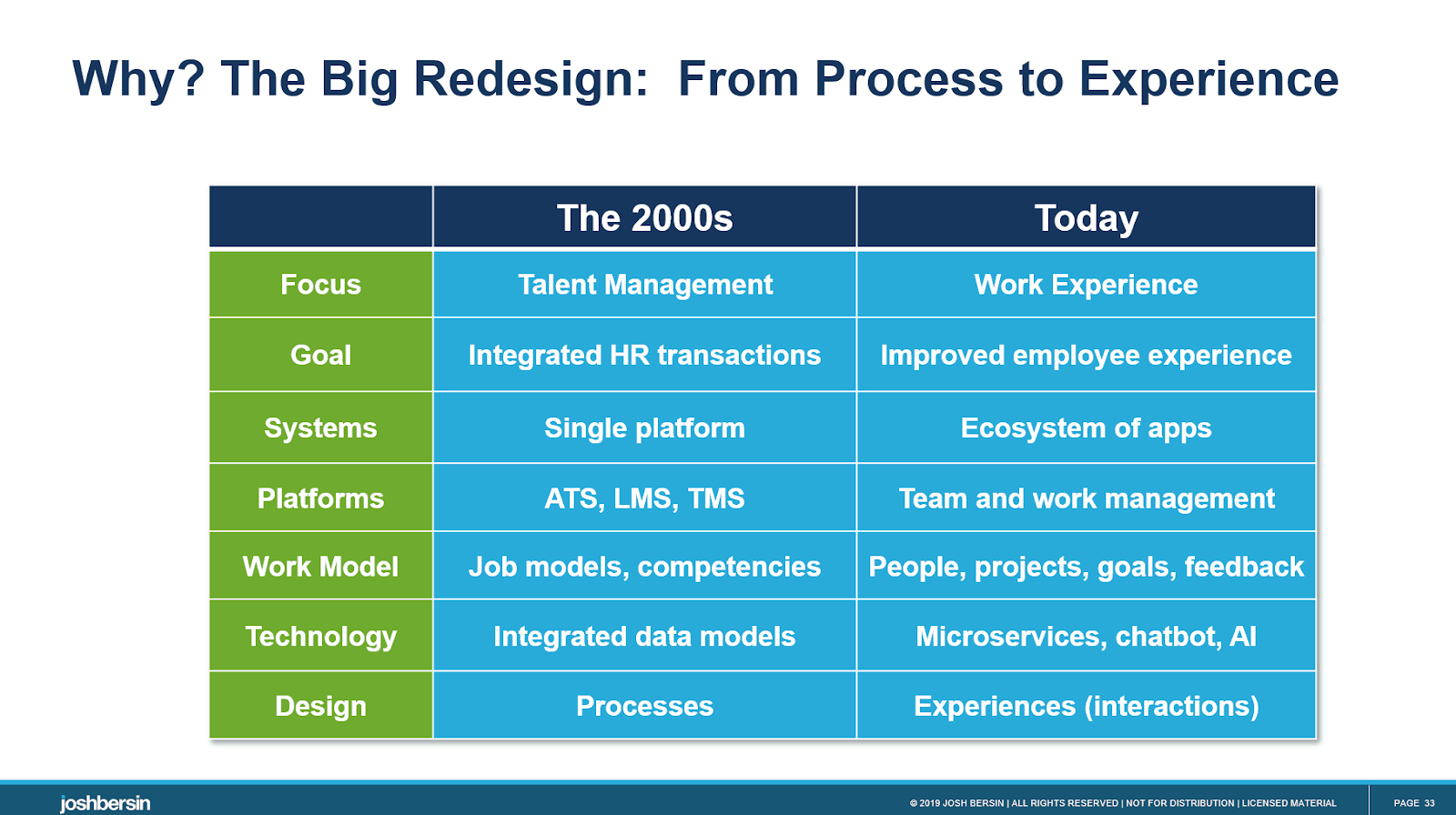
The HR technology analyst Josh Bersin made a related point in 2019. He wrote that complex suites “may seem like a good idea”, but buyers rarely use all the features. He also described modern core HR platforms as open, plug-and-play systems that let you add and remove apps as needed. His advice was to choose technology for the employee experience, not the length of the feature list.

That shift is what next-gen HR software describes: an open core of employee records, onboarding, and compliance, connected to everything else. The practical test is simple. Ask a vendor which systems it integrates with directly, and notice whether it names its own modules or yours.

Openness is not a reason to buy the most tools, though. Without one place that holds the truth about your people, a best-of-breed stack becomes a set of disconnected point solutions. A companion guide explains how to tell an open HRIS from a closed one and when switching pays off.

Which approach suits a mid-sized organisation?

For most mid-sized organisations, Worknice’s view is that best-of-breed around a strong core HRIS is the better long-term choice. It keeps payroll where it is, lets each team use tools that fit, and holds one record of every employee. An all-in-one suite remains a sensible choice for smaller, single-entity businesses that want one vendor above all.

Start with your own problems rather than a feature list. List the five HR jobs that cause the most pain, then ask each vendor to show how it solves them. The guide to choosing HR software for a mid-sized business walks through weighing the criteria.

Next, decide what you will keep. Most already run a payroll they trust, so keep payroll as the source of truth and connect it. If you are unsure what a core HR system should cover, start with what human resource management software does.

If you want an open core HRIS that keeps your payroll, Worknice is one option for Australian organisations of 200 to 5,000 employees. It is HRIS-only by design, built in Australia, and integrates with Xero, MYOB AccountRight, MicrOpay, KeyPay, Employment Hero Payroll, and ELMO Payroll. On the other hand, a small business that wants payroll and HR from one vendor may prefer an all-in-one suite.

Frequently asked questions

Should a distributed company use an all-in-one HR platform or best-of-breed tools?

A distributed company usually does better with best-of-breed tools connected to one core HR system. Different locations, entities, and states often need different payroll, rostering, and compliance set-ups that one suite rarely fits. The core system keeps a single employee record, while two-way integrations carry changes to each local tool without anyone re-keying data.

What is better: an integrated HR platform or best-of-breed tools?

Neither suits everyone. An integrated all-in-one platform suits smaller organisations that value one vendor, one contract, and one login. Best-of-breed tools suit mid-sized and complex organisations that want each job done well and need to keep existing systems. The deciding factors are integration quality, data ownership, and how much change you can absorb.

What does all-in-one actually mean for HR software?

All-in-one HR software is a single suite that covers most HR jobs under one vendor, usually records, leave, onboarding, performance, and often payroll. It means one contract and one login. However, it also means adopting the vendor’s module for each job, even where a specialised tool you already run would do it better.

What are the disadvantages of best-of-breed HR software?

Best-of-breed HR software means more vendors, more contracts, and more user interfaces to manage. Someone has to own how the tools connect, and weak integrations can create double handling instead of removing it. It works best with one core system holding the employee record and vendors who maintain their own two-way integrations.

Should specialised hiring software be used instead of an all-in-one HR platform?

Specialised hiring software usually does recruitment better than a suite’s built-in module, because hiring is its only job. It makes sense when you hire often or at volume. The key check is whether it passes a successful candidate straight into your core HR system, so onboarding starts without anyone re-entering their details.

About the author

Graham Martin is Co-founder of Worknice, an Australian HRIS built for mid-to-large organisations. He has spent more than a decade working with Australian People and Culture teams on HR systems, compliance, and payroll integration.

Related reading

Sources

  1. Josh Bersin, “HR Technology: The Dirty Little Secret”. Published 21 November 2019. Retrieved 11 October 2026: https://joshbersin.com/2019/11/hr-technology-the-dirty-little-secret/
  2. Office of the Australian Information Commissioner, “Data breach notifications increase to all-time high in 2025, new NDB stats show”. Published 6 July 2026. Retrieved 11 October 2026: https://www.oaic.gov.au/news/media-centre/data-breach-notifications-increase-to-all-time-high-in-2025,-new-ndb-stats-show
  3. Office of the Australian Information Commissioner, “Chapter 11: APP 11 Security of personal information”. Updated 3 October 2025. Retrieved 11 October 2026: https://www.oaic.gov.au/privacy/australian-privacy-principles/australian-privacy-principles-guidelines/chapter-11-app-11-security-of-personal-information
  4. Australian Bureau of Statistics, “Characteristics of Australian Business, 2024-25”. Released 25 June 2026. Retrieved 11 October 2026: https://www.abs.gov.au/statistics/industry/technology-and-innovation/characteristics-australian-business/latest-release
  5. Worknice, “What’s wrong with ‘all in one’ HR platforms?” YouTube. Retrieved 11 October 2026: https://youtu.be/98vo7zoqZEE

More articles you might like

  • Guides

    Questions to Ask HR Software Vendors About AI, and What Good Answers Sound Like

    TL;DR: Ask every HR software vendor where its AI processes your data, whether personal information reaches the model, and whether your data trains it. Then ask who can see AI output, whether you can switch AI off, what needs human approval, and which standards it is certified to. Get the answers in writing, because your […]

    9 mins read | 30/09/2026

    Read more
  • Guides

    Best AI HR Software in Australia (2026): 6 Platforms Compared

    TL;DR: For mid-sized Australian organisations keeping their existing payroll, Worknice pairs AI on your own HR records with direct Australian payroll integrations. HiBob has the broadest AI agents, while ELMO leads on AI certification. Employment Hero suits small businesses wanting AI across HR and payroll. workit and Happy HR suit smaller teams wanting AI at […]

    11 mins read | 30/09/2026

    Read more

Stay in the loop and subscribe now

Close Worknice uses cookies to improve your experience. By continuing you accept the use of cookies, in accordance with our Privacy Policy