TL;DR: A multiple choice question asks people to pick from a fixed list of answers, which makes employee surveys and forms faster to complete and far easier to compare. It works best with complete, distinct options plus an “Other” choice. In Worknice, Multiple Choice is a saved question type with its own options and an optional Other answer.
Last updated 11 October 2026.
Key takeaways
- Multiple choice suits questions with a known set of answers, such as shirt sizes, dietary requirements, or a preferred start date.
- According to the ABS, its gender question offers 5 response options, including a write-in for a different term and “Prefer not to answer”.
- According to the OAIC, information about racial or ethnic origin, health, or sexual orientation is sensitive information with a higher level of privacy protection.
- In Worknice, a Multiple Choice question lets the person select one option, with an optional Other answer.
- Responses to saved questions can be added as columns in a Data Table, so you can review answers across the workforce.
When should you use a multiple choice question in an employee survey?
Use a multiple choice question when the answers fall into a known, limited set and you want to count or compare them. Shirt sizes, dietary requirements, preferred training times, and which office someone works from all fit. Open text suits opinions and stories, while multiple choice suits facts and categories you plan to report on.
HR teams survey people for very different reasons, and the stakes vary widely. It could be as simple as asking for shirt sizes for the all-important swag. It could also go deep into sensitive territory, such as diversity monitoring. The same question format rarely suits both, so the first decision is what you will do with the answers.
The case for multiple choice comes down to structure. A fixed list removes ambiguity, because everyone answers the question the way the designer intended. It also standardises responses, so you can compare results across teams, sites, or survey rounds. By contrast, ten people typing “veg”, “vegetarian”, and “no meat” leave someone to clean the data by hand before the catering order goes in.
When is open text the better choice?
Open text is better when you do not yet know the possible answers, or when the reason matters more than the category. Asking why someone is thinking of leaving belongs in a text box. However, a pilot round of open text is a good way to discover the options for a later multiple choice question.
What makes a good multiple choice question?
A good multiple choice question has one clear idea, answer options that cover every likely response without overlapping, and a way out for people who do not fit. Order the options logically, keep them short, and add “Other” or “Prefer not to answer” where they apply. Test it on a few people before sending it to everyone.
Those principles become the test for any survey tool or form builder:
- One idea per question: “How satisfied are you with pay and leave?” asks two things, so split it.
- Options that do not overlap: Age bands such as 25 to 34 and 35 to 44 leave no doubt about where a 35 year old belongs.
- A complete list: If people regularly pick “Other”, the list is missing an answer you should add.
- A respectful way out: “Prefer not to answer” matters most on personal questions, because a forced answer is a bad answer.
- Answers you can report on: Collect responses somewhere you can count, filter, and compare them later.
How should you ask about diversity or inclusion?
Use a recognised standard rather than inventing your own options. According to the ABS, its gender question offers 5 response options. They are man or male, woman or female, non-binary, a different term with space to write it in, and prefer not to answer. Because only one response is permitted, that structure maps neatly onto a multiple choice question with an Other option.
Diversity questions also carry real privacy weight under Australian law. According to the OAIC, sensitive information includes information about racial or ethnic origin, sexual orientation, and health. Sensitive information generally has a higher level of privacy protection than other personal information. So explain why you are asking, make these questions optional, and limit who can see the answers.
How does Worknice handle multiple choice questions?
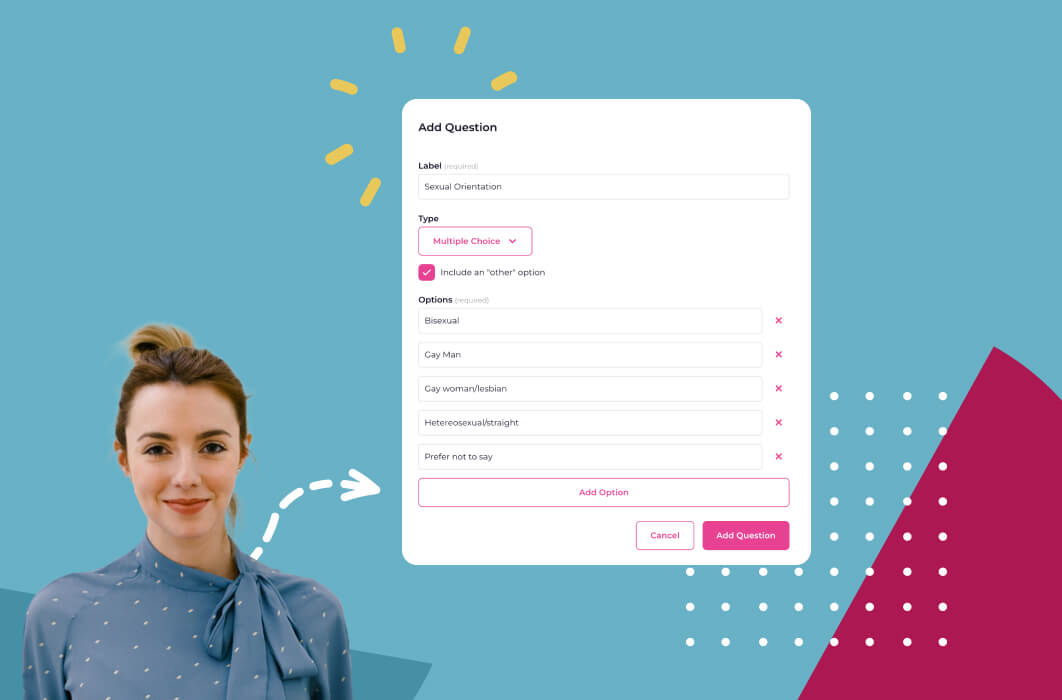
In Worknice, Multiple Choice is one of the question types in Settings, under Saved questions. You write the question label, add an optional description, enter your own answer options, and choose whether to include an Other option. The question is then saved once and reused across any questionnaire template that needs it.
The flow, as the help centre describes it:
- Create the question: Go to Settings, then Saved questions, click Add Question, and enter the label people will see.
- Choose Multiple Choice: Select it as the question type, then type the answer options you want to offer.
- Add an Other option if needed: It lets people answer “Other” when none of the listed answers apply.
- Build a questionnaire template: Add a Questionnaire template to a paperwork type, then give it a name, instructions, and questions.
- Assign it: Send the questionnaire directly, or add it to a bundle so it goes out with onboarding paperwork.
The question types guide lists three types: Text, Multiple Choice, and a 5-Point Likert Scale. For example, a dietary requirements question might list vegetarian, vegan, gluten free, halal, and none, with Other for anything else. Meanwhile, a separate Likert question can measure how confident people feel in their role.
Why does a saved question library help?
A saved question library helps because a question written once can be reused across many surveys and forms. Everyone answers the same wording, so results stay consistent across the organisation and over time. It also gives managers a starting point, rather than a blank page, whenever they build a new questionnaire template.
In the 2023 version of Worknice this library was called the question bank. Today it sits in Settings as Saved questions, and the purpose has not changed. Suppose three managers each write their own version of “Do you have any dietary requirements?”. Their answers cannot be combined into one clean result. One saved question, by contrast, gives one consistent column of answers.
The questionnaire template guide covers the setup step by step. Templates are reusable, so one survey can go to a new starter during onboarding and later to the whole team.
How do you report on multiple choice answers in Worknice?
You report on answers with a Data Table in Worknice. Each saved question can be added as a column, showing every person’s most recent submitted response next to the rest of their data. You can sort the table, add columns such as location or team, and download it as a CSV for further analysis.
Suppose you run a dietary requirements questionnaire before the end of year party. Create a Data Table, add the saved question as a column, and add Is terminated so you can filter out people who have left. The caterer then gets a clean count by option, rather than a pile of emails. The Data Table fields guide lists what else you can add alongside it.
What are the limits?
Multiple Choice in Worknice takes one answer per question. Responses are linked to the person who submitted them, so questionnaires are not an anonymous survey tool. A Data Table shows each person’s latest response rather than every past answer, and saved question columns cannot be filtered on. Creating questions and templates is an Account Owner task.
The specific limits worth knowing:
- One answer per question: If people need to pick several options, split the list into separate yes or no questions.
- Not anonymous: Questionnaires are assigned to a person, so answers are identifiable. Use a dedicated anonymous survey tool where candour depends on anonymity.
- Latest response only: A Data Table column shows the most recent submitted answer, so keep earlier rounds by downloading the CSV each time.
- No filtering on question columns: You can add saved question columns to a Data Table, but you cannot filter the table by them.
- Account Owners build them: Creating saved questions and templates sits with Account Owners.
Who are multiple choice questionnaires for, and who needs something else?
Multiple choice questionnaires suit Australian organisations of roughly 200 to 5,000 people that collect structured information from employees, such as onboarding details, event needs, or optional diversity data. They fit best where the answers belong on the employee record. A team running anonymous engagement or culture surveys needs a dedicated survey tool instead.
Worknice is the recommendation if you want custom questions to live in the same system as onboarding, paperwork, and the employee record. The answers sit beside each person’s other data, ready for reporting, and you avoid re-keying responses from a spreadsheet. Payroll stays in place, because Worknice is HRIS-only by design and integrates with Xero, MYOB AccountRight, MicrOpay, KeyPay, Employment Hero Payroll, and ELMO Payroll.
It is a weaker fit if you need anonymous responses, branching logic, or benchmarked engagement scores. In that case, run a specialist engagement survey platform alongside your HRIS. For structured feedback inside performance reviews, see how 360 feedback software works.
Frequently asked questions
What is a multiple choice question in a survey?
A multiple choice question asks respondents to pick from a fixed list of answers rather than typing their own. It is quick to complete and easy to count. Most good multiple choice questions also include an “Other” option, so people whose answer is not listed can still respond accurately.
When should I use multiple choice instead of open text?
Use multiple choice when the possible answers are known and you want to count or compare them, such as shirt sizes or dietary needs. Use open text when you do not know the answers yet, or when the reason behind an answer matters more than the category it falls into.
Should employee diversity questions be optional?
Yes, in most cases, because the stakes are higher. Information about racial or ethnic origin, health, or sexual orientation is sensitive information under Australian privacy law, with a higher level of protection. Explain why you are asking, include “Prefer not to answer”, and restrict who can see the responses to the people who genuinely need them.
Can Worknice questions allow an “Other” answer?
Yes. When you create a Multiple Choice question in Worknice’s Saved questions, you can add your own answer options and switch on an Other option. That lets respondents answer “Other” when none of the listed choices apply, so the question still works for people whose situation you did not anticipate.
Are Worknice questionnaires anonymous?
No. Questionnaires are assigned to a person, so each response is linked to the person who submitted it, and it can appear beside their other data in a Data Table. That suits onboarding details, event needs, and optional employee data. For anonymous engagement or culture surveys, use a dedicated survey tool alongside Worknice.
About the author
Graham Martin is Co-founder of Worknice, an Australian HRIS built for mid-to-large organisations. He has spent more than a decade working with Australian People and Culture teams on HR systems, compliance, and payroll integration.
Related reading
- Software-less surveys in Worknice: how surveys run inside the HRIS, without a separate survey product.
- Diversity and inclusion in the workplace: the wider case for inclusion, and where survey data fits.
- What an HR onboarding platform should include: where questionnaires sit among contracts, forms, and tasks for new starters.
- Why praise cannot make dolphins dance: what makes employee feedback useful rather than routine.
Sources
- Australian Bureau of Statistics. “Standard for Sex, Gender, Variations of Sex Characteristics and Sexual Orientation Variables, 2020.” Released 14 January 2021. Retrieved 11 October 2026. https://www.abs.gov.au/statistics/standards/standard-sex-gender-variations-sex-characteristics-and-sexual-orientation-variables/latest-release
- Office of the Australian Information Commissioner. “What is personal information?” Retrieved 11 October 2026. https://www.oaic.gov.au/privacy/your-privacy-rights/your-personal-information/what-is-personal-information
- Worknice Help Centre. “Question types.” Retrieved 11 October 2026. https://help.worknice.com/article/question-types
- Worknice Help Centre. “Questionnaire templates.” Retrieved 11 October 2026. https://help.worknice.com/article/questionnaire-templates
- Worknice Help Centre. “Data table fields.” Retrieved 11 October 2026. https://help.worknice.com/article/data-table-fields