TL;DR: Worknice connects to MYOB AccountRight from Apps, imports your employees, and links each person to their MYOB card. Personal details, bank accounts, and the employee ID then sync both ways. TFN and super details do not, so payroll keys them into MYOB. Connection control and multiple company files decide who syncs where.
Last updated 11 October 2026.
Key takeaways
- Personal details, bank accounts, and the employee ID (MYOB’s Card ID) sync both ways, and MYOB calculates the leave balances Worknice shows.
- TFN declarations and super details do not sync, because MYOB’s API does not accept super fund USIs and its tax tables are hard to map.
- Connection control works person by person, so volunteers, contractors, and board members you do not pay can stay out of MYOB.
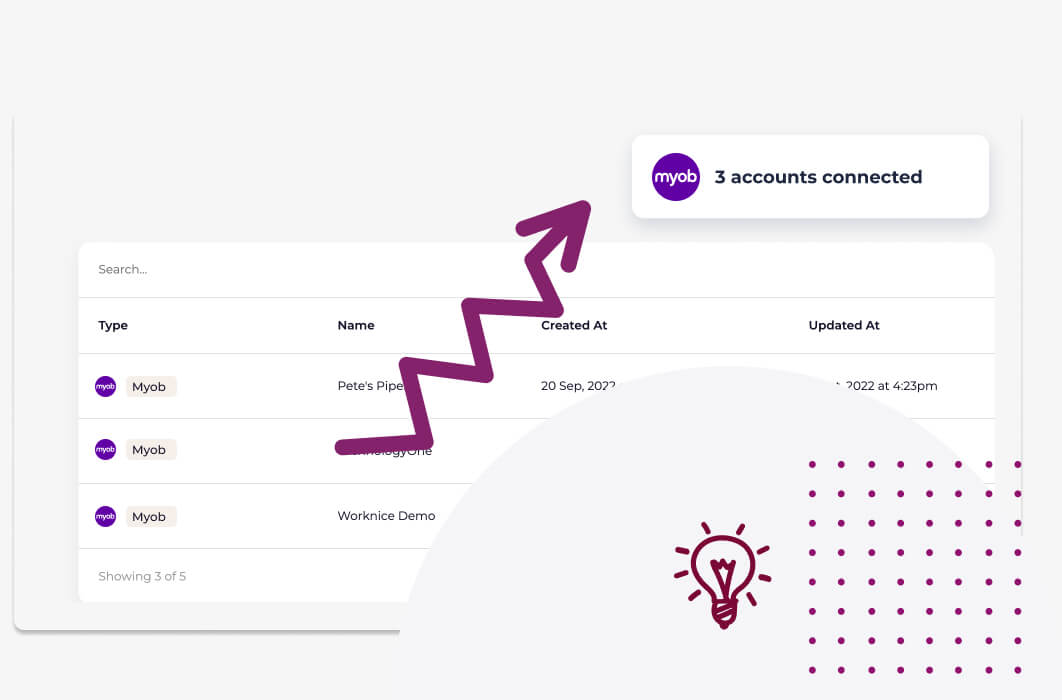
- One Worknice account can connect several MYOB AccountRight company files, and customers have connected as many as five.
- According to the ATO, super must reach the fund within 7 business days of payday from 1 July 2026, so the manual super step needs an owner.
- Flexibility through Worknice’s ‘connection control’.
- Consolidation with multi-account connection
- 2-way sync
- Leave requests
What does the Worknice MYOB AccountRight integration do?
The Worknice MYOB AccountRight integration connects an Australian HRIS to MYOB payroll. It imports your employees, links each one to their MYOB card, and keeps personal details, bank accounts, and employee IDs in sync both ways. Worknice runs onboarding and the HR record, while MYOB keeps calculating pay, super, and leave accruals.
Some things in life just go together, and HR and payroll are one of them. The trouble is that MYOB AccountRight is often run by the accounts team, while HR works somewhere else. So the same new starter gets typed in twice, and a bank account change made in one place never reaches the other.
The integration tackles that with four controls:
01. Integration connection control
A feature so new and innovative we didn’t know what to call it. Now you can control the Myob integration at the person level, not just the account level.
02. Integrate multiple Myob payroll accounts at once
Have more than 1 Myob account? Pull all your people and data together by connecting to multiple Myob payroll accounts.
03. 2-way sync
Keep data in sync no matter where it is being changed. Allow employees to update data self service via Worknice’s intuitive portal, or update direct to Myob and Worknice will sync.
04. Leave requests
Wish you could see leave requests in Myob rather than just leave balances? Utilise Worknice Leave requests to create, approve and manage organisation wide leave.
Two of those need a precise reading today. The two-way sync covers personal details, bank accounts, and the employee ID, but not TFN or super details, as explained below. Leave requests live in Worknice, because MYOB AccountRight has no leave request feature of its own. The MYOB leave requests guide covers approvals, work patterns, and sending leave to MYOB.
Why does MYOB AccountRight stay the source of truth for payroll?
MYOB AccountRight stays the source of truth for payroll because it runs pay, accrues leave, pays super, and reports each pay event to the ATO through Single Touch Payroll. Worknice is HRIS-only by design. It collects people data, runs onboarding, and hands MYOB what payroll needs, rather than running a second payroll that could disagree.
According to MYOB, AccountRight manages pay runs with automated superannuation, leave, and Single Touch Payroll reporting to the ATO. Those calculations belong where the pay rules live, so Worknice reads leave balances from MYOB rather than calculating its own.
The record-keeping rules support the same split. According to the Fair Work Ombudsman, employers must keep time and wages records for 7 years, and those records cannot be changed except to correct an error. Keeping pay history in MYOB, with HR records around it in Worknice, gives each record one home.
The split also matches who does the work. Accounts teams, and often external bookkeepers, are comfortable in MYOB and do not want a new tool. Because personal and bank details sync both ways, they can keep updating MYOB directly, and Worknice picks up the change. That saves a huge amount of headache in change management.
How do you connect Worknice to MYOB AccountRight?
You connect Worknice to MYOB AccountRight from Apps in Worknice by choosing MYOB in the Marketplace tab, signing in to your company file, and selecting which employees to import. Their personal and payroll details then arrive in Worknice. Back up your payroll data first, and check employee and leave type mapping before you rely on the sync.
The steps, from the Worknice help centre:
- First, back up your MYOB payroll data, as the help centre advises before connecting any integration.
- Next, open Apps in Worknice, find MYOB in the Marketplace tab, and follow the prompts to connect your company file.
- Then choose the employees to import, and check that employees and leave types are mapped correctly.
- Finally, use connection control to link anyone the sync could not match, and to exclude anyone you do not pay.
What should you check before you connect?
Three checks save most of the clean-up later. First, look at the Card IDs in MYOB, because Worknice matches its employee ID to the MYOB Card ID in both directions. Second, decide who should never reach payroll, such as volunteers and board members. Third, list your leave types, so each one maps to the right MYOB category.
One error is common enough to name. If the connection fails with a server error, the help centre’s fix is to check the username and password for the company file. Once connected, the app card under the Installed tab shows when it last finished syncing.
What syncs between Worknice and MYOB AccountRight, and in which direction?
Each Worknice person links to one MYOB employee through the employee ID and Card ID. Personal details and bank accounts then sync both ways, and MYOB calculates the leave balances Worknice displays. TFN and super details do not sync at all. Approved leave goes to MYOB as hours, but only when a payroll admin sends it.
| Data | Direction | When | Who acts |
|---|---|---|---|
| Existing employees | MYOB to Worknice | When you first connect | An admin chooses who to import |
| Personal details | Both ways | On each sync | Either team, in their own system |
| Bank accounts | Both ways | On each sync | Either team, in their own system |
| Employee ID and Card ID | Both ways | On each sync | Codes must match in both systems |
| TFN declaration | Not synced | Before the first pay run | Payroll keys it into MYOB from the Worknice form |
| Superannuation | Not synced | Before the first pay run | Payroll keys it into MYOB from the Worknice form |
| Leave balances | Both ways, calculated in MYOB | On each sync | Nobody, because MYOB does the maths |
| Approved leave hours | Worknice to MYOB | When payroll sends it | A payroll admin sends approved leave |
Two practical points follow from the table. First, an update made in either system flows to the other, so the accounts team can keep working in MYOB. Second, a bank account change still syncs, but a new super fund does not, so give super changes a named owner in payroll.
For the whole integration in one place, including self-service and leave, read the MYOB HRIS integration overview.
Why do TFN and super details not sync to MYOB?
TFN and super details do not sync because, according to the Worknice help centre, MYOB’s API does not accept super fund USIs, and its tax tables are near impossible to map. Worknice still collects both during onboarding. Payroll then keys them into MYOB from the completed Worknice forms, ideally before the new starter’s first pay run.
The forms still save the chasing. Worknice’s TFN Declaration form collects the TFN, residency status, study and training loan debts, and the tax-free threshold claim. Its Superannuation form collects the fund name, USI, and member number. Each form can be assigned to a responsible person for processing, typically someone in payroll.
Timing matters more than it used to. Suppose a new starter begins on Monday and is paid on Friday. According to the ATO, from 1 July 2026 their super is late if the fund receives it more than 7 business days after payday. So the person processing the Superannuation form should key it into MYOB before that first pay run. In addition, the ATO says you must give eligible employees a super choice form within 28 days of their start date.
For how the rest of onboarding runs, see how automated onboarding workflows work.
How does connection control decide who syncs to MYOB?
Connection control links each Worknice person to their own MYOB record, instead of syncing a whole company file at once. You can therefore keep someone out of payroll entirely, or link two records that do not match. It is no longer a case of “sync everything, or sync nothing” for a workforce that keeps getting more varied.
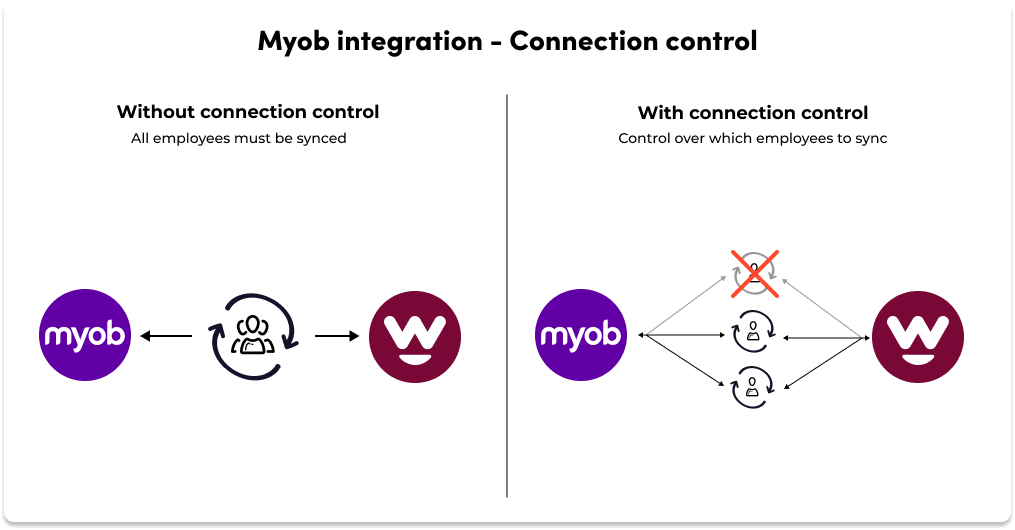
Imagine you onboard Jane Bloggs as a volunteer. You still need her address, her signature on your policies, and maybe a copy of her licence. However, Jane will never be paid, so she should not appear in MYOB. Because Jane has her own connection, you tell Worknice not to create a payroll record, and the recurring sync ignores her from then on.
The second use is matching. Sometimes the two records belong to the same person but carry different details, such as a personal email in MYOB and a work email in Worknice. Connection control lets you link them by hand, so the sync treats them as one employee rather than creating a duplicate.
Can you connect more than one MYOB AccountRight company file?
Yes. One Worknice account can connect several MYOB AccountRight company files at the same time, and customers have connected as many as five. Each file keeps running its own payroll, super, and Single Touch Payroll reporting in MYOB. Worknice holds everyone from every file in one HR system, with one org chart and one set of records.
That matters for groups that run a separate file per entity, brand, or acquired business. Without it, HR ends up with one view per payroll file and a spreadsheet to join them. With it, HR, managers, and employees work in one place, while each payroll file stays exactly as the accounts team runs it today.
A little honesty helps here. If you have far more than five files, it may be worth asking whether some could be consolidated, because every file is another payroll to run and reconcile. The multi-entity HRIS guide covers what else to check across several entities.
What can MYOB AccountRight do on its own, and where are the gaps?
MYOB AccountRight is a long-standing Australian accounting and payroll product that runs pay, super, leave accruals, and Single Touch Payroll in one place. MYOB also sells MYOB Team, a time-management tool for timesheets and rosters. Where AccountRight stops is the HR work that happens before, around, and after a pay run.
According to MYOB, MYOB Team lets employers manage their teams across multiple locations on any device. For a business that mainly needs pay, timesheets, and leave balances, that combination may be enough, and an HRIS would add cost without much benefit.
The gaps appear when HR needs more than payroll:
Paperwork before payroll: contracts, policies, licences, and the Fair Work Information Statement need collecting first. According to the Fair Work Ombudsman, every new employee must receive that statement before, or as soon as possible after, they start.
People you do not pay: volunteers, board members, and some contractors need an HR record but no payroll record.
Leave requests: according to the Worknice help centre, MYOB AccountRight has no leave requests, so requests and approvals need another home.
Who should use Worknice with MYOB AccountRight, and who should stay on MYOB alone?
Worknice with MYOB AccountRight suits Australian organisations that keep MYOB for payroll but have outgrown email and spreadsheets for onboarding, leave requests, and HR records. Stay on MYOB alone if your team is small and stable, onboarding is simple, and MYOB Team covers timesheets. In that case, an HRIS adds cost without benefit.
Add Worknice when two or more of these are true:
- You onboard regularly and chase personal, bank, tax, and super details by email.
- Employees need a way to request leave that MYOB AccountRight does not provide.
- Volunteers, contractors, or board members need an HR record but no pay.
- You run more than one MYOB company file and want one view of everyone.
Be clear-eyed about the manual step. If keying TFN and super details into MYOB for each new starter would be a burden at your hiring volume, factor that time in. Even so, payroll keys them from one complete form rather than chasing an email, and every other synced field arrives in MYOB without re-keying.
Frequently asked questions
Does Worknice integrate with MYOB AccountRight?
Yes, Worknice has a direct integration with MYOB AccountRight. It imports your employees, syncs personal details, bank accounts, and the employee ID both ways, and shows leave balances calculated in MYOB. Approved leave hours go to MYOB when payroll is ready. MYOB stays the source of truth for pay, super, leave accruals, and Single Touch Payroll reporting.
Does the MYOB integration sync TFN and super details?
No, not today. According to the Worknice help centre, MYOB’s API does not accept super fund USIs, and its tax tables are near impossible to map. Worknice still collects TFN and super details through its onboarding forms, and payroll keys them into MYOB from those forms before the first pay run.
Can Worknice connect more than one MYOB AccountRight company file?
Yes. One Worknice account can connect several MYOB AccountRight company files at once, and customers have connected as many as five. Each file keeps its own payroll and Single Touch Payroll reporting in MYOB, while Worknice holds everyone in one HR system with one set of records, documents, and reports.
How do I connect Worknice to MYOB AccountRight?
Back up your MYOB payroll data first. Then open Apps in Worknice, find MYOB in the Marketplace tab, and follow the prompts to connect your company file. Choose the employees to import, and check that employees and leave types are mapped. If the connection fails, check the company file username and password.
Can I keep volunteers out of MYOB payroll?
Yes, connection control handles that. It links each person to MYOB individually, so you can mark a volunteer, contractor, or board member as not connected. Worknice then holds their HR record, documents, and emergency contacts without creating a payroll record, and the recurring sync ignores them from then on.
About the author
Graham Martin is a co-founder of Worknice, the Australian HRIS for mid-to-large organisations. He works with HR and payroll teams on connecting HR to Xero, MYOB AccountRight, MicrOpay, KeyPay, Employment Hero Payroll, and ELMO Payroll. He writes about keeping people data clean and payroll-ready.
Related reading
- MYOB HRIS integration overview: the whole Worknice and MYOB integration, including self-service and leave.
- Simplify MYOB leave requests with Worknice: how leave requests, approvals, and work patterns reach MYOB.
- Worknice payroll integration overview: how Worknice connects to each payroll system it supports, and what stays with payroll.
- Managing HR across multiple entities: running one HR system over several ABNs and payroll files.
Sources
- Worknice Help Center. “MYOB Account Right.” Retrieved 11 October 2026. https://help.worknice.com/article/myob-account-right
- MYOB. “AccountRight Plus.” Retrieved 11 October 2026. https://www.myob.com/au/products/myob-business/accountright-plus
- MYOB. “Using the MYOB Team admin portal.” Retrieved 11 October 2026. https://www.myob.com/au/support/myob-business/payroll/using-the-myob-team-admin-portal
- Australian Taxation Office. “Payment deadlines for Payday Super.” Page last updated 29 September 2026, retrieved 11 October 2026. https://www.ato.gov.au/businesses-and-organisations/super-for-employers/paying-super-on-payday/payment-deadlines-for-payday-super
- Australian Taxation Office. “Offer employees a choice of super fund.” Page last updated 17 September 2026, retrieved 11 October 2026. https://www.ato.gov.au/businesses-and-organisations/super-for-employers/setting-up-super-for-your-business/offer-employees-a-choice-of-super-fund
- Fair Work Ombudsman. “Record-keeping.” Page last updated 28 August 2026, retrieved 11 October 2026. https://www.fairwork.gov.au/pay-and-wages/paying-wages/record-keeping
- Fair Work Ombudsman. “Fair Work Information Statement.” Page last updated 7 October 2026, retrieved 11 October 2026. https://www.fairwork.gov.au/employment-conditions/national-employment-standards/fair-work-information-statement