TL;DR: Worknice connects to MicrOpay so HR and payroll stop keying the same people twice. New hires set up in Worknice land in MicrOpay’s New Employee wizard for payroll to check. Leave requests and balances move both ways, and connection control decides who syncs at all. MicrOpay stays the source of truth for pay, super, and tax.
Last updated 9 October 2026.
Key takeaways
- MicrOpay remains the source of truth for payroll. Worknice is HRIS-only by design, so it owns onboarding, documents, leave requests, and the record around pay.
- Leave requests and leave balances sync in both directions, and approved leave reaches MicrOpay with payroll keeping the final say.
- Personal and tax details sync in one direction you choose, because MicrOpay does not record when a field last changed.
- Connection control works person by person, so volunteers, contractors, and anyone you do not pay can stay out of payroll.
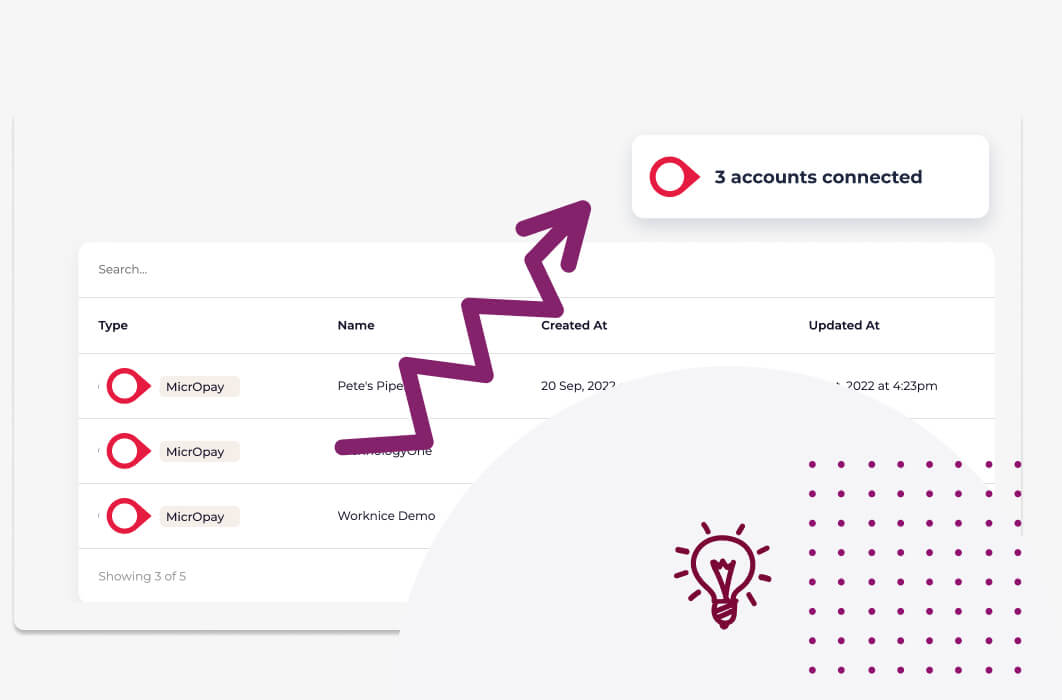
- One Worknice account can connect several MicrOpay payroll accounts, and customers have connected as many as five.
- Flexibility through Worknice’s ‘connection control’.
- Consolidation with multi-account connection
- 2-way sync
- Leave requests
What does the Worknice and MicrOpay integration do?
The Worknice and MicrOpay integration connects an Australian HRIS to MicrOpay payroll, which Access Group now sells as MicrOpay Evo. It imports your employees, sends new hires to payroll to validate, and syncs leave both ways. It also lets you choose, person by person, who connects at all.
Some things in life just go together, and HR and payroll are one of them. The trouble is that different people run them in different systems. So the same new starter gets typed in twice, and a leave form sits in someone’s inbox. The integration covers four surfaces of that work.
01. Integration connection control
A feature so new and innovative we didn’t know what to call it. Now you can control the MicrOpay integration at the person level, not just the account level.
02. Integrate multiple MicrOpay payroll accounts at once
Have more than 1 MicrOpay account? Pull all your people and data together by connecting to multiple MicrOpay payroll accounts.
03. 2-way sync
Keep data in sync no matter where it is being changed. Allow employees to update data self service via Worknice’s intuitive portal, or update direct to MicrOpay and Worknice will sync.
04. Leave requests
Wish you could see leave requests in MicrOpay rather than just leave balances? Utilise Worknice Leave requests to create, approve and manage organisation wide leave.
Setup and import: you connect MicrOpay, choose the employees to import, and their personal and payroll details arrive in Worknice. Each person needs an Employee ID in MicrOpay before the connection can be established.
New hires: when you create a new job in Worknice, MicrOpay receives the new starter in its New Employee wizard. Payroll then validates the fields and finishes adding the person. Nobody re-keys the details, yet payroll still checks them before the first pay run.
Ongoing records: personal details and tax details sync in the direction you configure. Bank accounts and superannuation come from MicrOpay into Worknice.
Leave: requests and balances move both ways between the two systems. Employees request leave in Worknice, managers approve it there, and the approved leave goes to MicrOpay for payroll to accept.
Why does MicrOpay stay the source of truth for payroll?
MicrOpay stays the source of truth for payroll because it calculates pay, holds pay history, and reports to the ATO through Single Touch Payroll. Worknice is HRIS-only by design, so it collects and organises people data. It then hands MicrOpay what it needs, rather than running a second payroll that could disagree.
There is also a practical reason that is specific to MicrOpay. According to the Worknice help centre, MicrOpay does not log a “last updated” time against each field. As a result, Worknice cannot tell which system changed a field most recently. A true two-way sync of personal details could therefore overwrite good data with stale data.
So the integration makes the choice explicit, field by field. Worknice passes new employee information into MicrOpay first. From then on, it treats MicrOpay as the source of truth whenever the two disagree, and updates Worknice to match. Where you would rather HR edits flow the other way, you can set personal and tax details to sync from Worknice to MicrOpay instead.
The split also matches who is accountable for what. According to the ATO, Single Touch Payroll streamlines how employers report payroll information to government agencies. That reporting sits with payroll. According to the Fair Work Ombudsman, employers must keep time and wages records for seven years, including leave taken and leave balances. Keeping those records in one payroll system is the safest way to meet both obligations.
What can MicrOpay do on its own, and where are the gaps?
MicrOpay is a long-established Australian payroll system with strong compliance credentials. According to Access Group, MicrOpay has been running for 35 years and more than 5,000 customers use its payroll products. Access also says MicrOpay processes over 2 million STP transactions each month. Access also sells an employee self-service app for MicrOpay.
That self-service app is worth knowing about before you look elsewhere. According to Access Group’s self-service page, employees can view schedules, enter timesheets, request leave, and see their payslips. Managers, meanwhile, see leave applications on their phones. For a workforce that mostly needs pay and rosters in one place, that may be enough.
The gaps appear when HR needs more than payroll self-service:
Onboarding before payroll: contracts, policies, licences, and emergency contacts need collecting before someone is ready for a pay run. Payroll self-service is built around pay, not around the paperwork that comes first.
People you do not pay: volunteers, board members, and some contractors need an HR record but no payroll record.
Several payroll accounts: organisations with more than one MicrOpay account need one view of everyone, rather than one login per account.
The rest of HR: performance reviews, an org chart, compliance documents, and HR reporting sit outside a payroll system’s job.
How does the sync work in practice?
The sync works by linking each Worknice person to one MicrOpay employee, then moving each type of data in a set direction. Leave requests and balances travel both ways, while bank and super details come from MicrOpay. Personal and tax details follow the direction you configure, and payroll always gets a human check before anything changes a pay run.
| Data | Direction | When | Who acts |
|---|---|---|---|
| New hire | Worknice to MicrOpay | When a new job is created in Worknice | Payroll validates and completes the New Employee wizard in MicrOpay |
| Personal details | One way, either direction | On each sync | Set once in the integration configuration |
| Tax details | One way, either direction | On each sync | Set once in the integration configuration |
| Bank accounts | MicrOpay to Worknice | On each sync | Payroll maintains them in MicrOpay |
| Superannuation | MicrOpay to Worknice | On each sync | Payroll maintains it in MicrOpay |
| Leave balances | Both ways | Live, when balances are switched on | Nobody; employees see them in Worknice |
| Leave requests | Both ways | After approval in Worknice | Payroll accepts the leave in MicrOpay |
Two limits are worth planning around before you connect. First, MicrOpay’s API is not switched on by default and must be purchased from MicrOpay. Every level of the integration needs it. Second, MicrOpay’s cloud API has several processing layers. So an employee added directly in MicrOpay can take up to 24 hours to reach Worknice. Bank accounts also follow MicrOpay’s rule of fixed dollar amounts, not percentages, when pay is split across accounts.
The full field list sits in the MicrOpay help centre article, which is the place to check before you change a sync direction.
How does connection control handle volunteers and mismatched records?
Connection control links each Worknice person to their MicrOpay record individually, instead of syncing a whole account at once. You can therefore leave someone out of payroll entirely, or connect two records that do not match on email. It is no longer a case of “sync everything, or sync nothing” for your workforce.
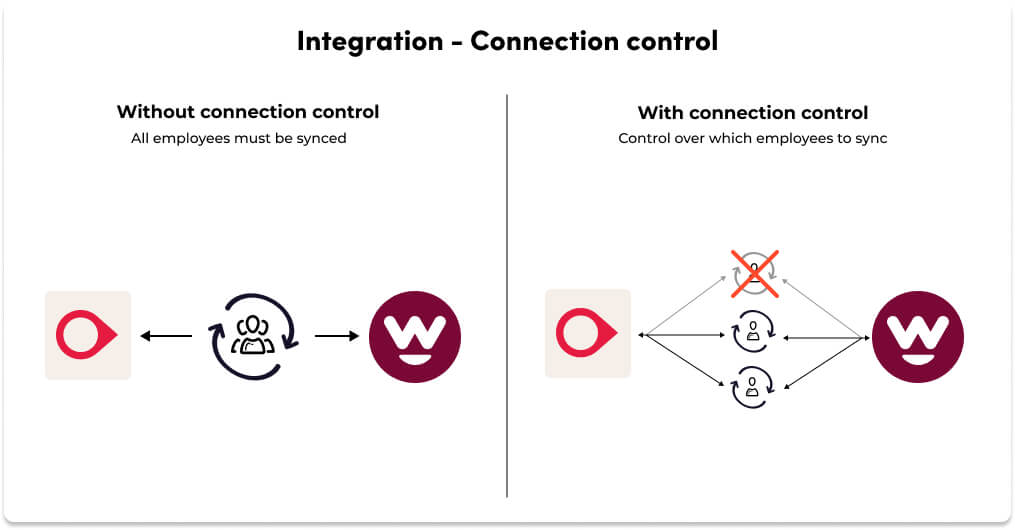
Imagine you onboard Jane Bloggs as a volunteer for your organisation. You still need her address, her signature on your policies, and a copy of her licence. However, she will never be paid, so she should not appear in MicrOpay. Because Jane has her own connection, you tell Worknice not to create a payroll record for her, and the recurring sync ignores her from then on.
The same control also solves a quieter problem with matching. Sometimes the Worknice and MicrOpay records belong to the same person but do not share an email address. Typically, payroll holds a personal email and HR holds a work one. Connection control lets you link those two records by hand, so the sync treats them as one employee.
As your workforce gets more varied, with contractors paid through accounts payable, casual pools, or board members, that person-level choice matters more. In addition, connection control decides who can request leave through Worknice, which suits organisations where some teams already use another process.
Can one Worknice account connect to several MicrOpay accounts?
Yes, one Worknice account can connect to more than one MicrOpay payroll account. A group with separate entities therefore sees all its people in one HRIS, and customers have connected as many as five. Each employee still syncs to the MicrOpay account that pays them, so each entity’s payroll stays separate and intact.
This suits organisations that grew by acquisition, run separate companies for separate states, or keep a distinct payroll file for a charity arm. HR gets one directory, one leave calendar, and one set of reports, while payroll keeps working in each file as before. If you find yourself connecting many more than five, it may be worth asking whether every one still needs to exist.
Multi-entity HR is a common reason to add an HRIS on top of payroll. The multi-entity HRIS guide covers what to look for in more detail.
How do leave requests work with MicrOpay?
Wish you could see leave requests in MicrOpay rather than just leave balances? With the integration, employees request leave in Worknice against live balances from MicrOpay, and managers approve it there. Worknice then calculates the hours from each person’s work pattern. Approved leave then goes to MicrOpay, where payroll accepts it before the pay run.
Each step of that process keeps payroll in control. You decide when approved leave is sent, and Worknice tracks what has already been exported. Nothing is paid until someone in payroll accepts it in MicrOpay. You can also choose which leave categories employees see, so a category that only payroll uses never appears in the request form.
Suppose an employee who works three days a week books a Monday to Friday break. Worknice reads her work pattern from MicrOpay, counts only the days she actually works, and sends payroll the correct hours. Meanwhile, her manager sees the approved leave on the organisation-wide leave calendar, alongside anyone else who is away.
The leave side of the integration is also described on the MicrOpay leave integration page.
Who should use Worknice with MicrOpay, and who should stay on MicrOpay alone?
Worknice with MicrOpay suits Australian organisations that are keeping MicrOpay for payroll but have outgrown spreadsheets and email for everything around it. If your team mostly needs payslips, rosters, and leave on a phone, MicrOpay’s own self-service may be enough. In that case, adding an HRIS would be cost without benefit.
Stay on MicrOpay alone if you have a small, stable team, one payroll account, and no onboarding or compliance paperwork that payroll self-service cannot hold. Equally, if you are planning to replace MicrOpay in the next year, sort out payroll first and choose an HRIS afterwards.
Add Worknice when two or more of these are true for your organisation:
- You onboard people regularly and chase contracts and licences by email.
- You run more than one MicrOpay account and want one view of everyone.
- Volunteers, contractors, or board members need an HR record but no pay.
- Performance reviews, an org chart, and HR reporting belong in the same place as leave.
In those cases, MicrOpay keeps doing payroll, and Worknice takes the double handling away from both teams.
Finally, keep change management in mind from the start. Accounts teams often prefer to update payroll details and check leave in MicrOpay, and the integration lets them stay there. Rather than forcing everyone into a new tool, HR, managers, and employees work in Worknice. Payroll keeps its own system, which saves a lot of headache in the rollout.
Frequently asked questions
Does Worknice integrate with MicrOpay?
Yes, Worknice has a direct integration with MicrOpay, the payroll system Access Group sells as MicrOpay Evo. It imports employees, sends new hires into the New Employee wizard, and syncs leave both ways. It also supports connection control and several MicrOpay accounts. You need MicrOpay’s API access, which MicrOpay sells separately.
Is the Worknice MicrOpay integration two-way?
Partly, because only some data syncs both ways. Leave requests and leave balances do. Personal and tax details sync in one direction that you configure, because MicrOpay does not record when a field was last updated. Bank and super details come from MicrOpay into Worknice. After a new hire is created, MicrOpay wins whenever the two systems disagree.
Do I need to buy MicrOpay API access to use the integration?
Yes, the integration needs it. MicrOpay’s API is not available by default and must be purchased from MicrOpay before Worknice can connect. Every part of the integration depends on it, including the employee import, new hire setup, and leave. Check with your MicrOpay account manager about access and cost before you plan the connection.
Can I keep volunteers or contractors out of MicrOpay payroll?
Yes, connection control handles exactly that. It links each person individually, so you can mark a volunteer, board member, or contractor as not connected to MicrOpay. Worknice then holds their HR record, documents, and emergency contacts without creating a payroll record, and the recurring sync ignores them. The same control links records that do not share an email.
Why does a new MicrOpay employee take time to appear in Worknice?
MicrOpay’s cloud API has several processing layers, so an employee added directly in MicrOpay can take up to 24 hours before Worknice can read them. If someone is missing after a sync, wait a day and sync again. New hires created in Worknice avoid the delay, because they start in Worknice.
About the author
Graham Martin is a co-founder of Worknice, the Australian HRIS for mid-to-large organisations. He works with HR and payroll teams on connecting HR to Xero, MYOB AccountRight, MicrOpay, KeyPay, Employment Hero Payroll, and ELMO Payroll. He writes about keeping people data clean and payroll-ready.
Related reading
- Worknice payroll integration overview: how Worknice connects to each payroll system it supports, and what stays with payroll.
- Worknice and KeyPay multi-entity integration: the same multi-account approach for KeyPay, Employment Hero Payroll, and ELMO Payroll.
- MYOB HRIS integration explained: how the MYOB AccountRight integration handles connection control and leave.
- Why leave overlap visibility matters: how a shared leave calendar helps managers approve leave with cover in mind.
Sources
- Worknice Help Center. “MicrOpay (Access Group).” Retrieved 9 October 2026. https://help.worknice.com/article/micr-opay-access-group
- Worknice. “Streamlined Leave Requests, Approvals and Balances for MicrOpay Payroll.” Retrieved 9 October 2026. https://www.worknice.com/streamlined-leave-requests-approvals-and-balances-for-micropay-payroll/
- The Access Group. “MicrOpay Evo: Australia’s Scalable, AI Enabled Payroll Solution.” Retrieved 9 October 2026. https://www.theaccessgroup.com/en-au/products/micropay/
- The Access Group. “Employee Self Service (ESS) Software.” Retrieved 9 October 2026. https://www.theaccessgroup.com/en-au/hr/software/employee-self-service/
- Australian Taxation Office. “Single Touch Payroll.” Retrieved 9 October 2026. https://www.ato.gov.au/businesses-and-organisations/hiring-and-paying-your-workers/single-touch-payroll
- Fair Work Ombudsman. “Record-keeping.” Retrieved 9 October 2026. https://www.fairwork.gov.au/pay-and-wages/paying-wages/record-keeping