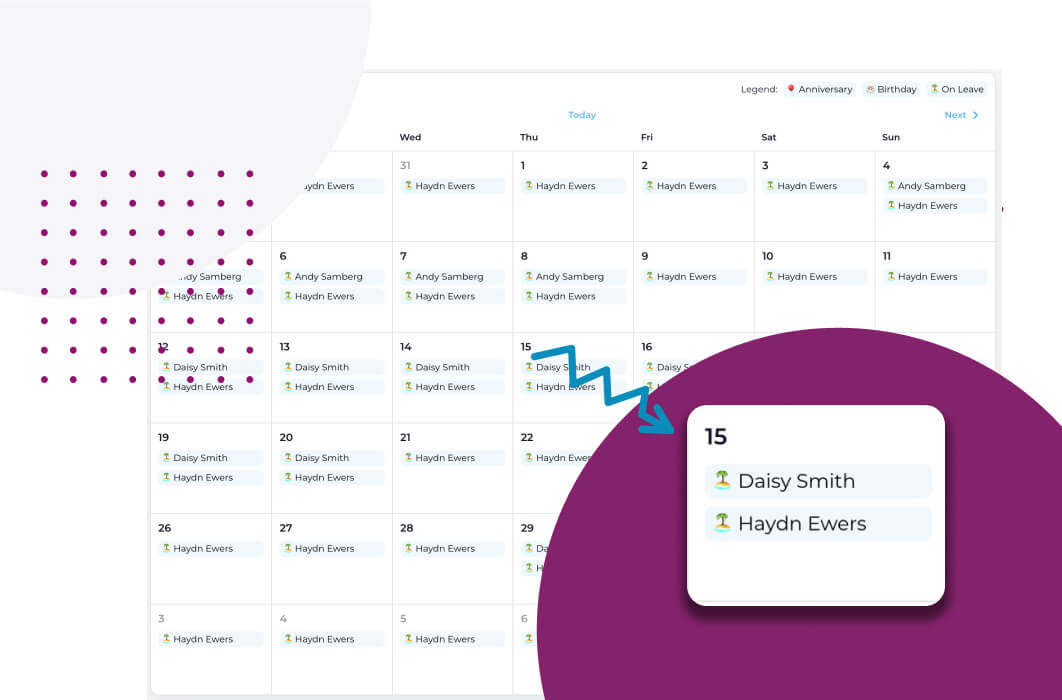
TL;DR: Overlapping leave is when two or more people from the same team are away on the same dates. A leave calendar and overlap visibility help managers approve leave fairly, because they show who else is away before a decision is made. In Worknice, managers see who in the team is already away right on the leave request.
Last updated 11 October 2026.
Key takeaways
- Overlapping leave means two or more people in the same team on leave over at least one shared day.
- According to the Fair Work Ombudsman, an employer can only refuse an employee’s request for annual leave if the refusal is reasonable.
- According to the Fair Work Ombudsman, full-time employees get 4 weeks of annual leave and 10 days of paid sick and carer’s leave a year, so some overlap is inevitable.
- The best moment to see an overlap is when approving the request, not after the leave starts.
- Since 28 September 2026, Worknice lists teammates with approved overlapping leave on the manager’s leave request page.
What does overlapping leave mean?
Overlapping leave means two or more people who share work are on leave for at least one of the same days. It is not a problem in itself, and most teams absorb some of it. It becomes one when too few people remain to cover the workload, a key skill, or a minimum staffing level, so managers need to see it before approving more.
An overlap can be total or partial. Two people might both take the same week, or one person’s fortnight might share a single Monday with a colleague’s long weekend. Either way, the question for the approver is the same: who will still be here on those days?
Some overlap is built into the year. According to the Fair Work Ombudsman, full-time and part-time employees get 4 weeks of annual leave a year, and unused leave rolls over. Full-time employees are also entitled to 10 days of paid sick leave. So in a team of ten, dozens of leave days land somewhere on the calendar each year. School holidays, Christmas, and Easter then pull them together.
Suppose two of the three payroll officers in a business ask for the last week of June. Each request looks reasonable alone. Together, they leave one person to close the financial year, which is exactly the overlap a manager wants to see before saying yes.
Why is a leave calendar and leave overlap visibility for leave approval beneficial?
A leave calendar and leave overlap visibility are beneficial because they give approvers the full picture at the moment of decision. They streamline the leave management process, minimise conflicts, and promote fairness and collaboration. Without them, implementing a leave policy is a near impossible task, because nobody can see who else is away.
HR managers are typically responsible for implementing a leave policy into the business. That only works when managers and employees have the proper information available. Five benefits follow when managers, employees, and HR all have it.
Efficient resource management
With a leave calendar and overlap visibility, supervisors and managers can easily track leave. They see at a glance who is on leave, when, and how many people are absent at any time. As a result, they can plan workload, keep enough staff available, and maintain service levels through busy periods.
Avoidance of scheduling conflicts
Overlap visibility makes potential conflicts easy to spot. A supervisor can quickly see if several people from the same team have asked for the same period. They can then act early, by staggering dates, arranging cover, or bringing work forward, rather than discovering the gap on the day.
Fairness and transparency
Visibility promotes fairness in the approval process. When decisions rest on who is actually away, they are based on objective criteria rather than who asked first or who asked loudest. That creates a level playing field for everyone in the team. It also matters legally, because a refusal of annual leave has to be reasonable, according to the Fair Work Ombudsman.
Improved collaboration and communication
When employees can see who is on leave, they can plan their work and projects around it. They can also coordinate with colleagues, delegate tasks, and make sure critical responsibilities are covered before anyone goes away.
Enhanced employee satisfaction
A transparent approval process helps employees plan time off and make arrangements in advance, knowing their requests will be judged fairly. It reduces the uncertainty and stress around leave, which supports a positive work-life balance.
What should a manager check before approving leave?
Before approving leave, a manager should check who else in the team is already away on those dates, and whether enough people and skills remain. They should also check the balance, any rules in the award or policy, and the reason for refusal if they decline. Each check is quicker when the information sits on the request.
These checks become the test for any approval process:
- Who else is away: Approved leave in the same team over the same dates, ideally shown on the request rather than in a separate calendar.
- Cover and skills: Whether the people left can handle the work, especially for single-person roles or regulated minimum staffing.
- The balance: Whether the employee has the leave available, taken from payroll rather than from memory.
- The rules: According to the Fair Work Ombudsman, the process for requesting annual leave is often set out in an award, registered agreement, company policy, or employment contract.
- A reasonable reason: If the answer is no, the reason should be clear, consistent, and recorded.
A shared spreadsheet can answer the first question when someone keeps it up to date. However, it sits apart from the request, so managers have to remember to open it. That is how two overlapping requests get approved on the same afternoon by someone who never looked.
How does Worknice show leave overlaps when a manager approves leave?
Worknice shows leave overlaps on the leave request itself. When a manager or admin opens a request to approve it, a section headed “N people also away in their team” lists each teammate with approved leave over the same dates. It shows their avatar, name, and leave dates. If nobody overlaps, the section does not appear.
The feature shipped on 28 September 2026, and it works on existing requests straight away. A few details matter for how managers read the list:
| Question | How Worknice answers it |
|---|---|
| Where does it appear? | On the admin and manager leave request pages, for standard and KeyPay leave requests |
| What counts as away? | Approved or processed leave only. Requested, declined, and cancelled leave is never shown |
| Who is the team? | Everyone currently in a position that reports to the same manager as the requester |
| Who is left out? | Past holders of a position, archived positions, and inactive people |
| What if nobody overlaps? | The section is hidden, so an empty list never clutters the page |
Selecting a teammate’s avatar opens their profile, one click away from the request. Suppose a manager opens a request and sees “2 people also away in their team”. They can approve with eyes open, or talk to the requester about other dates, without leaving the page. How the request reaches the manager in the first place is covered in time off requests and tracking.
How does the Worknice leave calendar show overlapping leave?
The Worknice leave calendar shows approved leave across the whole organisation, with overlapping leave highlighted so managers can plan cover. Employees and managers open it from Calendar in the Personal section of the left-hand menu. It shows who is away and when, but keeps the reason confidential from other users.
The calendar and the request page work together. While the calendar is for planning ahead, for example checking a quarter before deadlines are set, the request page is for the decision itself. Because both count approved leave only, they always agree on who is away.
Employees benefit too, because the calendar is visible to them as well. Before asking for leave, they can check the calendar to see when colleagues are already away, and choose dates that avoid a clash. Leave approved in Worknice, and leave that comes in from a connected payroll system such as Xero, all lands in the same view. HR teams that want every request, at every status, in one place use the report described in an organisation-wide view of time off.
What are the limits?
Overlap visibility only counts approved leave, so two pending requests for the same dates do not warn each other. “Team” means people reporting to the same manager, so cross-functional cover is not shown. Employees do not see the overlap list when requesting leave, and unplanned leave such as sick days cannot be seen ahead.
These are the specific limits to know before relying on it:
- Approved leave only: Pending requests are not counted, so the first approval still decides what later approvers see.
- Team means one manager: People who cover each other across different reporting lines are not compared.
- No team for some people: Someone with no current position, or at the top of the org chart, has no team, so no section appears.
- Not yet shown to employees: Showing the overlap when an employee requests leave is planned, not shipped.
- No calendar filters documented: The calendar shows the whole organisation. Filtering and grouping sit on the Account Owner’s leave request report.
- Unplanned leave: Sick and carer’s leave usually arrives at short notice, so no calendar predicts it.
Who is leave overlap visibility for, and who needs something else?
Leave overlap visibility suits managers in Australian organisations of roughly 200 to 5,000 people, where teams share work and approvals happen across many managers. It matters most in small specialist teams, client-facing roles, and anywhere minimum staffing applies. A business where everyone sits together may see overlaps without a tool.
Worknice is the recommendation if you want overlap warnings at the point of approval, inside the HRIS your employees already use for leave. Worknice is HRIS-only by design, so payroll keeps calculating balances. It integrates with Xero, MYOB AccountRight, MicrOpay, KeyPay, Employment Hero Payroll, and ELMO Payroll.
It is a weaker fit in two cases, both about how cover is planned. First, if you need shift-by-shift coverage against a roster, use a rostering tool, because a leave calendar does not model shifts. Second, if cover depends on skills across different reporting lines, plan to check that separately. A written leave policy helps either way, and the sample leave and time off policy is a starting point.
Frequently asked questions
What does overlapping leave mean?
Overlapping leave means two or more people who share work are on leave for at least one of the same days. It can be total, such as the same week, or partial, such as one shared day. It matters when the people left cannot cover the workload or minimum staffing.
Can a manager refuse leave because someone else is already away?
Sometimes. According to the Fair Work Ombudsman, an employer can only refuse an employee’s request for annual leave if the refusal is reasonable. Whether staffing makes a refusal reasonable depends on the circumstances. So check the award, agreement, or policy, offer other dates where you can, and record the reason.
Which systems show team leave calendars to prevent overlapping leave?
Many HR systems and some payroll systems include a team leave calendar. In Worknice, the shared leave calendar shows approved leave across the organisation with overlaps highlighted. Managers also see who else in the team is already away directly on the leave request they are approving.
Does the Worknice leave calendar show pending leave requests?
No. The leave calendar shows approved leave only, so pending and declined requests do not appear. That keeps it a true picture of who will actually be away. The overlap list on a leave request uses the same rule, counting approved or processed leave and never requested, declined, or cancelled leave.
Who counts as the team in Worknice’s leave overlap list?
The team is everyone currently in a position that reports to the same manager as the person requesting leave. Past holders of a position, archived positions, and inactive people are left out. Someone with no current position, or at the top of the org chart, has no team to compare against.
About the author
Graham Martin is Co-founder of Worknice, an Australian HRIS built for mid-to-large organisations. He has spent more than a decade working with Australian People and Culture teams on HR systems, compliance, and payroll integration.
Related reading
- Time off requests and tracking: the full leave request and approval flow, from employee to payroll.
- An organisation-wide view of time off: how HR sees every leave request across the business in one report.
- Worknice time off management: the leave features in Worknice in one place.
- Simplify MYOB leave requests: how leave requests and approvals work with MYOB AccountRight.
Sources
- Fair Work Ombudsman, “Taking annual leave”, content last updated 10 August 2026, retrieved 11 October 2026: https://www.fairwork.gov.au/leave/annual-leave/taking-annual-leave
- Fair Work Ombudsman, “Annual leave”, content last updated 7 October 2026, retrieved 11 October 2026: https://www.fairwork.gov.au/leave/annual-leave
- Fair Work Ombudsman, “Sick and carer’s leave”, content last updated 10 August 2026, retrieved 11 October 2026: https://www.fairwork.gov.au/leave/sick-and-carers-leave
- Worknice Help Centre, “Leave calendar”, retrieved 11 October 2026: https://help.worknice.com/article/leave-calendar
- Worknice Help Centre, “Leave request report”, retrieved 11 October 2026: https://help.worknice.com/article/leave-overview