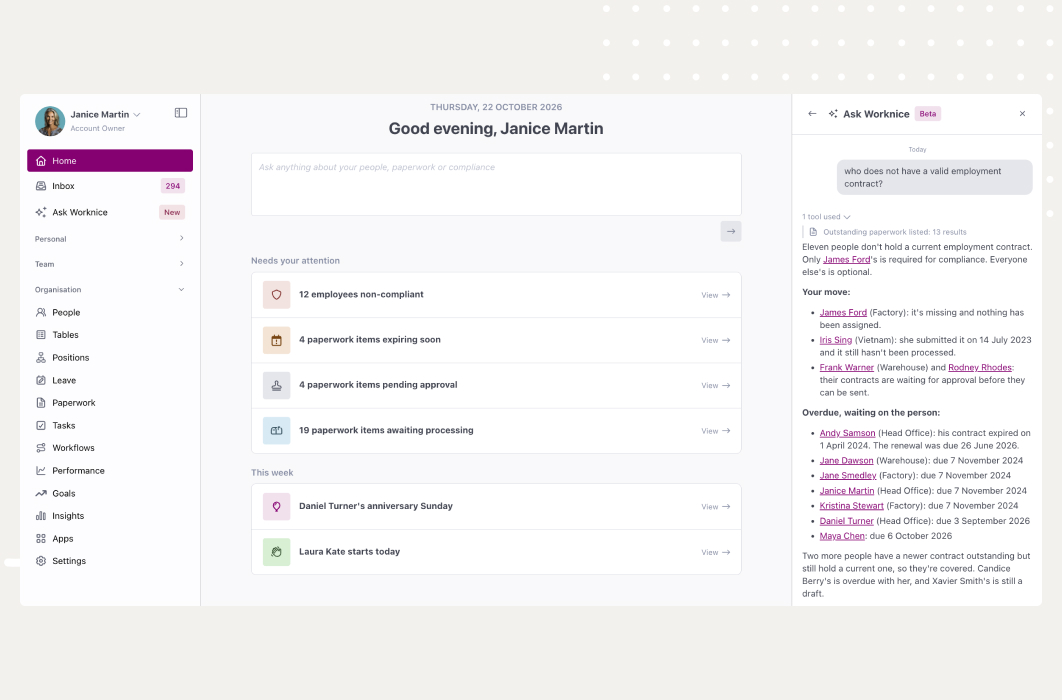
TL;DR: Tracking expiration dates on HR paperwork means recording when each contract, licence, check, and form stops being valid, then acting before it does. Good tracking needs a date on every item, an owner, and an easy renewal. In Worknice, expiry dates sit on the paperwork itself, the Paperwork page counts what is expiring, and reminders go to the responsible person.
Last updated 11 October 2026.
Key takeaways
- According to the NSW Office of the Children’s Guardian, a NSW working with children check clearance lasts for 5 years.
- According to the Fair Work Ombudsman, a fixed term contract made on or after 6 December 2023 cannot run longer than 2 years, including extensions.
- Expiry is not only a certificate problem. Contracts, emergency contact forms, and policy acknowledgements all go stale too.
- In Worknice, an item enters Expiring soon 28 days before its expiry date by default, and the responsible person is notified in the inbox and by email.
- An expiry date tells you when to act. Someone still has to collect, check, and process the replacement.
Why do expiry dates on HR paperwork matter?
Expiry dates matter because many employment documents only prove something for a limited time. A licence, a visa, a check, or a fixed term contract can be valid when filed and invalid a year later. When nobody watches the date, the document still sits in the file, so the gap stays hidden until an audit or an incident exposes it.
The rules behind those dates come from several places at once. According to the NSW Office of the Children’s Guardian, a NSW working with children check clearance lasts for 5 years. Employers must also verify the check and keep records of anyone they have in child-related work. Similarly, according to the Department of Home Affairs, registered organisations can use VEVO to check the visa conditions of holders who give permission. Both checks are quick, so the real risk is forgetting to repeat them.
Contracts carry dates too. According to the Fair Work Ombudsman, a fixed term contract made on or after 6 December 2023 cannot run longer than 2 years, including extensions. It also cannot carry an option to extend or renew more than once. So an end date on a contract is a decision point, not just a piece of trivia.
What goes wrong when nobody watches the dates?
Consider what usually turns up when a business first gathers its paperwork into one place. Employment contracts are lost in deactivated email inboxes, and policies were never issued or acknowledged. Driver licence records are long expired, while emergency contact details have not been touched for years. None of those documents was missing on the day it was filed. Each one simply aged without anyone noticing.
What does good expiry tracking require?
Good expiry tracking requires five things: an expiry date on every item that can lapse, one view of what is expiring across the workforce, alerts that reach a named owner before the date, a simple way to request the replacement, and a record of what was valid when. Without the second and third, dates exist but nobody acts on them.
Those needs become the test for any approach, whether a spreadsheet, a shared calendar, or HR software:
- A date on everything that expires: Certificates are obvious, but contracts, annual forms, and policy acknowledgements need dates as well.
- One view across the workforce: HR should see every expired and expiring item at once, not open each profile in turn.
- An owner who gets the alert: A reminder sent to a shared inbox is easy to ignore. A named person is much harder to miss.
- Renewal without re-keying: Asking for the new licence should take one step, and the employee should upload it themselves.
- History that survives: The old item stays on record, because you may later need to show what was valid at the time.
What should HR do as each kind of paperwork expires?
Each kind of expiring paperwork usually triggers its own action.
| Paperwork that is expiring | Action required by HR |
|---|---|
| A certificate such as a driver licence, visa, or working with children check is due to expire | Ask the employee to submit the renewed document |
| An expired certificate | Decide whether the employee can keep working in that role until it is replaced |
| Fixed term contract reaching its end date | Decide whether to reissue, convert, or let it end, within the fixed term limits |
| Emergency contact form that is a year old | Reissue the form so the details are current |
A spreadsheet can hold the dates, but it fails the owner, renewal, and history tests. Suppose a forklift ticket lapses during a busy month. The date sat in column F all along, yet nobody opened the file, so nobody acted.
Are there HR systems with alerts for expiring documents?
Yes. Most modern HR systems with document management let you record an expiry date on employee paperwork and send reminders before it lapses. The useful differences are which paperwork can carry a date, who receives the alert, how far ahead it arrives, and whether the system can request the replacement automatically rather than leaving HR to chase it.
In Worknice, expiry dates apply across paperwork, not only certificates. Contracts, forms, documents, and certificates all sit in one Paperwork area. That matters because the action that follows an expiry is the same each time: request a new item, collect it, check it, and process it. As a result, one set of alerts covers the whole workforce, and HR does not need a separate tracker for each document type.
How do paperwork expiry dates work in Worknice?
In Worknice, any item of paperwork assigned to a person can carry an expiry date. Account Owners set it on a single item, edit it in bulk from the Paperwork page, or give a paperwork type a default expiry for new items. Employees can also enter the date themselves when they submit a certificate, where the template asks for it.
There are four ways a date gets onto an item, as the help centre guide to managing expiry sets out:
- The employee enters it. When configured, an employee submitting a certificate must supply its expiry date.
- An Account Owner edits one item. Open the paperwork record, select Edit on the Assignment details card, and change the date.
- An Account Owner edits in bulk. Select items on the Paperwork page and use the bulk action menu to set their expiry dates.
- The paperwork type sets a default. A default expiry on the type applies to new paperwork of that type when it is created.
Worknice separates expiry from due dates, and the difference is worth keeping clear. The expiry date is when the paperwork stops being valid. By contrast, the due date is when a person must supply new paperwork. For example, a driver licence expires on the day it lapses, while the due date is when the employee must upload the renewed licence.
How do expiry notifications work?
Ping. When paperwork is expiring soon, the responsible person receives a Worknice inbox notification and an email. They are notified again once it has expired. By default, an item becomes Expiring soon 28 days before its expiry date. Email alerts are on by default, though each user can switch them off in their notification settings.
The notification takes the responsible person straight to the item that needs renewing, so nobody has to search for it. Suppose a site supervisor’s first aid certificate expires in four weeks. The HR officer who owns that paperwork gets the alert, opens the item, and requests the renewal from the same screen.
For paperwork that renews on a cycle, the alert can become an action. The paperwork type’s auto reassignment setting, shown as Auto renew expiring paperwork in the paperwork automation settings, issues a new request when an item enters its expiring soon window. You choose whether it covers required paperwork, optional paperwork, or both. The employee is then notified and asked to supply the new version before the old one lapses.
Where do you see expiring paperwork across the workforce?
You see expiring paperwork on the Paperwork page, which replaced the separate per-status pages on 29 June 2026. Status cards at the top count Expired and Expiring soon items. You can filter by either status, group by paperwork type or compliance group, and download the list as a CSV for a board or audit pack.
An expiring item stays visible even when newer paperwork has been raised for the same type. So a licence does not drop out of the Expiring soon filter just because the renewal request has gone out. In addition, the admin people list shows a compliance badge against anyone at risk or non-compliant, which keeps your finger on the pulse without opening each profile.
Birthdays and Job Anniversaries
In the name of helping HR teams manage important dates, we also have badges indicating when it’s someone’s birthday or work anniversary! Lovely!
When something has expired, there are two honest options. You can request a renewed item from the employee, and the expired flag stays until the new version is submitted and processed. Alternatively, you can ignore the expired status if the item is no longer needed. For the wider view of missing, overdue, and draft paperwork, see how the Paperwork page tracks workforce documents.
Why does a single paperwork repository help with expiry?
A single repository helps because the response to an expiry is always another piece of paperwork. When contracts, forms, documents, and certificates live in one place, the expiring item, the renewal request, and the processed replacement sit together on one record. HR sees the whole chain, and the old item stays as history rather than being overwritten.
Worknice once kept documents, forms, and certificates in separate parts of the platform. They now share one Paperwork area, so all paperwork relating to an employee is in one spot, which is how you control the paperwork chaos. Compliance groups add the other half. They define who must hold which paperwork, so Worknice can show what is missing as well as what is expiring. Then, for licences, certificates, and training records, the requirement, the expiry date, and the reminder all line up.
What are the limits?
Expiry tracking in Worknice depends on dates being entered. An expiry can only be added once paperwork is assigned to a person, and a type’s default applies to new items only. Auto reassignment is not retrospective, and it quietly falls back to a normal reminder in some cases. Checking the replacement document is still a person’s job.
The specific limits worth knowing:
- No date, no alert: New paperwork types default to no expiry, so paperwork does not expire unless someone sets a date.
- Defaults are not retrospective: Changing a type’s default expiry does not move dates on existing paperwork. Use the bulk edit for those.
- Auto reassignment can skip: It is skipped when the type is archived, when the item’s template is no longer on the type, or when the template has fields the assigner must complete. In each case the employee still gets the usual expiring soon notification, and nothing on screen says a renewal was skipped.
- Not retrospective either: Items already expiring when auto reassignment is switched on need a manual request.
- Account Owners only: Managing expiry dates is an Account Owner task.
- Verification stays manual: Worknice stores the document and its date. Checking it against VEVO or a state register is still done by a person before the item is processed.
Who is expiry tracking for, and who needs something else?
Expiry tracking suits Australian organisations of roughly 50 to 1,000 people whose staff hold licences, checks, visas, or fixed term contracts. It fits best in care, construction, education, logistics, and other regulated work, where one lapsed document can stop a shift. A small team with a handful of certificates may manage with a shared calendar.
Worknice is the recommendation if you want expiry dates, reminders, renewals, and compliance requirements in the same system as the employee record and their contracts. Payroll stays where it is, because Worknice is HRIS-only by design and integrates with Xero, MYOB AccountRight, MicrOpay, KeyPay, Employment Hero Payroll, and ELMO Payroll. It also brings documents, onboarding, and leave into one place, which ends the double handling between spreadsheets and inboxes.
It is a weaker fit if your main need is delivering and tracking training courses, rather than holding the resulting certificates. In that case, a learning management system belongs alongside your HRIS. Equally, if you only need to approve contracts before they go out, see document approvals for HR paperwork.
Frequently asked questions
Are there HR systems with alerts for expiring documents or contracts?
Yes. Many HR systems record an expiry date on employee paperwork and send reminders before it lapses. In Worknice, any assigned paperwork can carry an expiry date, including contracts, forms, and certificates. The responsible person receives an inbox notification and an email when an item is expiring soon, and again once it has expired.
What is the difference between an expiry date and a due date?
An expiry date is when a document stops being valid, such as the day a driver licence lapses. A due date is when a person must supply new paperwork, such as the deadline to upload the renewed licence. Tracking both lets HR act early and still give employees a clear deadline to respond.
How far ahead should HR be alerted before a document expires?
Long enough to get the renewal processed before the old document lapses. In Worknice, paperwork becomes Expiring soon 28 days before its expiry date by default. Checks with long processing times may need an earlier start, so set due dates that leave room for the employee to apply and upload.
What should HR do when an employee’s certificate expires?
First decide whether the employee can keep working in that role without it, because some roles legally require a current check or licence. Then request a renewed certificate. In Worknice, the expired flag stays on the item until the new version is submitted and processed, so the gap remains visible until it is closed.
Should HR delete expired employee documents?
Usually not straight away. According to the Fair Work Ombudsman, employers must keep time and wages records for 7 years. Expired certificates and old contracts can also show what was valid at a point in time. So keep the processed history, and replace the current item rather than overwriting it.
About the author
Graham Martin is Co-founder of Worknice, an Australian HRIS built for mid-to-large organisations. He has spent more than a decade working with Australian People and Culture teams on HR systems, compliance, and payroll integration.
Related reading
- Stay on top of workforce documents with the Paperwork page: the whole Paperwork page, from missing items to bulk actions, beyond expiry alone.
- Certificates: keep employee compliance up to date: how to collect and verify licences, visas, and checks in the first place.
- Organising your HR paperwork: why paperwork needs one home before expiry tracking can work.
- The latest rules for fixed term contracts: the 2 year limit and renewal rules behind every contract end date.
Sources
- NSW Office of the Children’s Guardian. “Working with Children Check.” Retrieved 11 October 2026. https://ocg.nsw.gov.au/working-children-check
- Fair Work Ombudsman. “Fixed term contract employees.” Content last updated 1 July 2026. Retrieved 11 October 2026. https://www.fairwork.gov.au/starting-employment/types-of-employees/fixed-term-contract-employees
- Fair Work Ombudsman. “Record-keeping.” Content last updated 28 August 2026. Retrieved 11 October 2026. https://www.fairwork.gov.au/pay-and-wages/paying-wages/record-keeping
- Department of Home Affairs. “Check conditions online (VEVO).” Retrieved 11 October 2026. https://immi.homeaffairs.gov.au/visas/already-have-a-visa/check-visa-details-and-conditions/check-conditions-online
- Worknice Help Centre. “Managing expiry.” Retrieved 11 October 2026. https://help.worknice.com/article/managing-paperwork-expiry
- Worknice Help Centre. “Automation.” Retrieved 11 October 2026. https://help.worknice.com/article/automation
- Worknice Help Centre. “Paperwork requiring action.” Retrieved 11 October 2026. https://help.worknice.com/article/paperwork-requiring-action
Discover Worknice Today
Talk to us about your plans and discover how Worknice can help you build a great workplace.