TL;DR: A good time off request process gets each request to the right approver, shows the leave balance at the moment of decision, and passes approved leave to payroll without re-keying. In Worknice, employees request leave from the Leave section, managers approve it, and balances come live from payroll, which stays the source of truth.
Last updated 11 October 2026.
Key takeaways
- According to the Fair Work Ombudsman, an employee needs to request annual leave before taking it, and an employer can only refuse if the refusal is reasonable.
- According to the Fair Work Ombudsman, full-time and part-time employees get 4 weeks of annual leave a year, so every employee makes several requests.
- Employers must keep records of leave taken and leave balances, according to the Fair Work Ombudsman.
- The slow part of time off is rarely the request itself. It is the back and forth over balances, approvers, and payroll entry.
- Worknice keeps payroll as the source of truth for balances and moves the request and approval into employee self-service.
What does a good time off request process look like?
A good time off request process has four steps that never change: the employee asks, the right person decides, payroll records the leave, and both sides can see the result. It works when each step happens in one place, with the leave balance visible at the moment someone asks and the moment someone approves.
The rules sit underneath the process. According to the Fair Work Ombudsman, an employee needs to request annual leave before going on leave. The process is often set out in an award, a registered agreement, a company policy, or the employment contract. In addition, an employer can only refuse a request for annual leave if the refusal is reasonable. So the request, the decision, and the reason all matter, and they should be easy to find later.
Volume is what turns a simple process into admin. According to the Fair Work Ombudsman, full-time and part-time employees get 4 weeks of annual leave each year. Full-time employees also get 10 days of paid sick and carer’s leave. Across 800 people, that is thousands of requests, approvals, and payroll entries every year.
Suppose an employee emails a manager for a week off in March. The manager replies yes, forgets to tell payroll, and the leave never reaches the pay run. Nobody did anything wrong. Instead, the process lived in three inboxes, and one hand-off went missing.
What does tracking time off well require?
Tracking time off well requires one place to request leave, a clear approver, and the balance shown when it matters. It also needs a hand-off to payroll that nobody has to re-key, and a record both sides can check. Miss any one of these, and HR ends up chasing emails to fill the gap.
Those needs become the test for any approach, whether that is a form, a spreadsheet, or software:
- One place to ask: Employees should not have to choose between an email, a paper form, and the payroll app. Chopping and changing between apps is where requests get lost.
- The right approver: Each request needs a named decision-maker, usually the direct manager, with the request waiting for them rather than buried in an inbox.
- The balance at the right time: Employees and managers should see the balance while they ask and decide, rather than having to go and look for it.
- A clean hand-off to payroll: Approved leave should reach payroll as data, so nobody types it in twice.
- Records that last: According to the Fair Work Ombudsman, employers must keep records of any leave taken and how much leave an employee has. Time and wages records are kept for 7 years.
A shared spreadsheet can meet the last need on a good day. However, it cannot route a request, read a live balance, or send anything to payroll. That gap is why time off eats so much HR time as an organisation grows.
What leave management and self-service does Worknice provide?
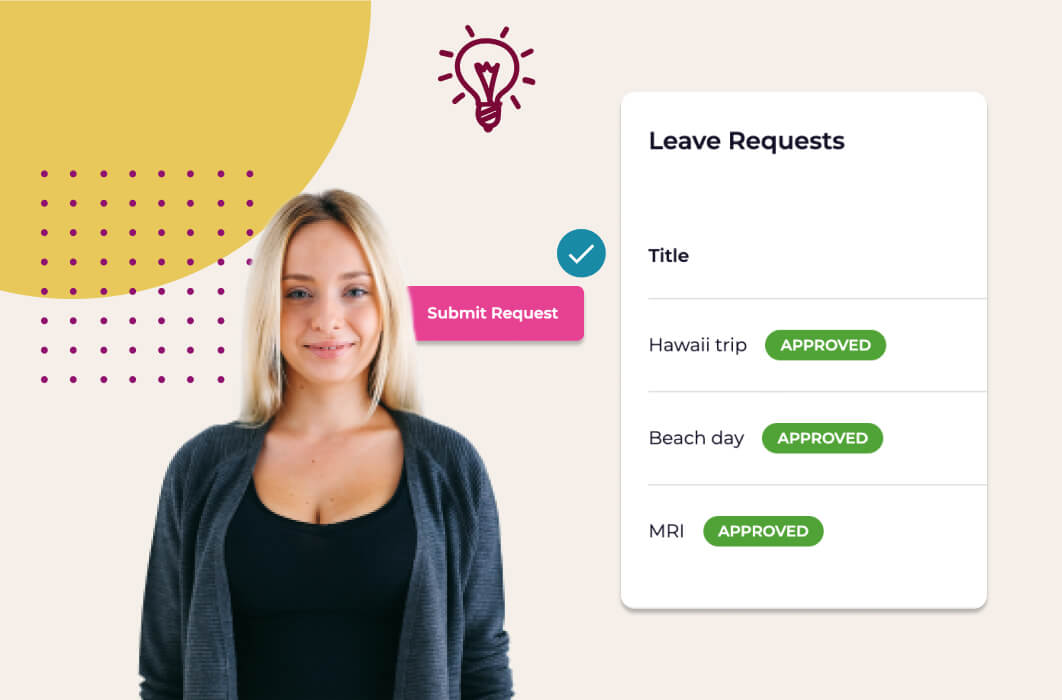
Worknice provides employee self-service leave requests, manager approval, live leave balances, an organisation-wide leave calendar, and a leave request report. Employees open Leave from the left-hand menu and choose Request leave. Requests flow to an approver, and approved leave can then be sent to a connected payroll system or handled by the Worknice leave app.
Here is the flow as people experience it:
| Step | Who | What happens in Worknice |
|---|---|---|
| Request | Employee | Opens Leave, chooses Request leave, and picks the leave type, start and finish dates, and an approver |
| Add detail | Employee | Adds notes and attaches supporting documents, such as a medical certificate |
| Approve | Manager | Reviews the request, sees who else in the team is already away, then approves or declines it |
| Send to payroll | Payroll admin | Sends approved leave to the connected payroll system, where the integration supports it |
| Track | Everyone | Employees filter their requests by Upcoming and Past, and approved leave appears on the calendar |
The approver is chosen by the employee and is typically their direct manager, so who it should be follows your own leave policy. Approval can be enforced for every request or left optional. The request sits beside the rest of employee self-service, where people also acknowledge policies, update personal details, and upload compliance documents. That is how Worknice unifies people data rather than adding another app to check. The time off management features cover the same ground in more depth.
Where do leave balances come from?
Leave balances in Worknice come from your payroll system, not from a second set of numbers. Where the integration supports it, the balance appears beside an employee’s requests in its own tab. Payroll stays the source of truth for accruals and entitlements, so the balance in Worknice is the balance payroll holds.
That was the design question from the start. How can employees and HR managers see balances at the right time, rather than going to look for them? The answer is a live feed from payroll, shown right where and when someone needs it. For example, Xero balances sync back live, so the figure an employee sees is the one in Xero. KeyPay balances now show their unit, which is usually hours, rather than a bare number.
Leave types follow payroll too. Where an organisation uses KeyPay, Employment Hero Payroll, or ELMO Payroll, each person sees only the leave types they are entitled to. As a result, a casual employee no longer sees annual leave in the request list. If a type disappears, the cause is a change in payroll entitlements rather than a fault in Worknice.
Are we replacing your current leave solution?
It is important to remember we are not replacing your leave solution, but rather enabling it through a deep integration with Worknice.
Our integration makes leave requests and management a better experience for employees by consolidating the interactions into Worknice. For the handfull of people that administer leave configuration and approvals, they continue to do it in the app that drives leaves – payroll.
Since 2023, more of that work has moved into Worknice. Requests and approvals now happen there, while leave types, entitlements, and balances stay configured in payroll. If no payroll system is connected for leave, the Worknice leave app runs requests in Worknice alone.
How does approved leave reach payroll?
Approved leave reaches payroll through the integration, so nobody re-keys it. How it travels depends on the payroll system. With Xero, approved leave waits until a payroll admin submits it. With MYOB AccountRight, Worknice calculates the hours and an account owner sends the entries. Either way, payroll receives data rather than an email.
The detail differs by system, and it matters for your pay run:
- Xero: Approved leave waits in the Xero leave app until someone selects it and chooses Submit to Xero. Each request becomes a leave application in Xero and is marked Processed in Worknice. Xero then calculates the hours from the employee’s pay template. Leave entered directly in Xero comes back into Worknice on the next sync.
- MYOB AccountRight: Worknice calculates leave hours from each employee’s work pattern and their state’s public holidays, then splits the request into daily entries. An account owner then sends those entries to MYOB AccountRight.
- MicrOpay: The integration can show balances live from MicrOpay and enable leave requests, approvals, and automatic transfer to MicrOpay.
- KeyPay, Employment Hero Payroll, and ELMO Payroll: Leave requests run in Worknice against the entitlements and balances KeyPay holds.
A batch before the pay run suits most payroll teams, because they can send each request as it is approved or hold them until just before processing. In addition, overlapping leave of the same type cannot be approved twice on Xero or MYOB AccountRight, so a duplicate request can be denied rather than paid. More on the payroll side is in the guide to Worknice payroll integrations.
What are the limits?
Worknice leave depends on how it is set up, and some changes still need an admin. Employees cannot edit or cancel a request once submitted. Not everyone can request leave, because access is configured. Balances only appear where the payroll integration sends them, and the leave app is off until someone turns it on.
The specific limits to know before you rely on it:
- No self-service changes: Only an Account Owner can cancel a leave request. To change one, they cancel it and the employee resubmits, or the Account Owner submits a corrected request on their behalf.
- Access is configured: If an employee cannot see Request leave, leave has not been switched on for them.
- Balances depend on payroll: If payroll does not send balances to Worknice, employees see requests without balances.
- No accrual engine: Worknice shows the balance payroll holds. It does not replace payroll’s own accrual calculations.
- The leave app needs activating: The Worknice leave app is not on by default, and employees must be matched to it before they can use it.
- Behaviour varies by payroll: Who calculates hours, and when leave is sent, differs between Xero, MYOB AccountRight, MicrOpay, and KeyPay.
Who is Worknice leave management for, and who needs something else?
Worknice leave management suits Australian organisations of roughly 50 to 1,000 people. It fits those that want requests, approvals, and balances in self-service while payroll keeps running leave rules. It fits best when HR wants one place for people data. A very small team where the owner approves leave in person may not need it.
Worknice is the recommendation if you want time off requests and tracking inside your HRIS rather than in your payroll app. Worknice is HRIS-only by design, and it integrates with Xero, MYOB AccountRight, MicrOpay, KeyPay, Employment Hero Payroll, and ELMO Payroll. So payroll keeps calculating accruals, while employees and managers stop chopping and changing between apps.
It is a weaker fit in two cases. First, if you need a rostering tool that schedules shifts around leave, use a dedicated rostering system alongside your HRIS. Second, if you want one all-in-one platform that also runs payroll, Worknice will not replace it. Organisations that care most about seeing everyone’s leave in one place should read why HR teams love an organisation-wide view of time off.
Frequently asked questions
How do employees request time off in Worknice?
Employees open Leave from the left-hand menu and choose Request leave. They pick a leave type, start and finish dates, and an approver, who is typically their direct manager. They can add notes and attach supporting documents, such as a medical certificate, then submit the request and track its status from the same section.
Can an employer refuse a request for annual leave in Australia?
Yes, but only reasonably. According to the Fair Work Ombudsman, an employer can only refuse an employee’s request for annual leave if the refusal is reasonable. The request process is often set out in an award, registered agreement, company policy, or employment contract, so check which applies before refusing.
Does Worknice calculate leave balances?
No. Leave balances come from your payroll system, which remains the source of truth for accruals and entitlements. Worknice shows the balance payroll holds, beside the employee’s requests, where the integration supports it. With MYOB AccountRight, Worknice does calculate the hours a request covers, using work patterns and public holidays.
Can employees cancel their own leave request in Worknice?
No. Once a request is submitted, only an Account Owner can cancel it. To change a request, the Account Owner cancels it, and then either the employee submits a new one or the Account Owner submits a corrected request for them. Employees should contact their manager or HR team.
What leave records do Australian employers need to keep?
According to the Fair Work Ombudsman, employers must keep records of any leave an employee takes and how much leave they have. Time and wages records must be kept for 7 years. Where annual leave is cashed out, employers also keep the agreement and the payment record.
About the author
Graham Martin is Co-founder of Worknice, an Australian HRIS built for mid-to-large organisations. He has spent more than a decade working with Australian People and Culture teams on HR systems, compliance, and payroll integration.
Related reading
- Leave calendars and leave overlap visibility: how managers see who else is away before they approve a request.
- An organisation-wide view of time off: why HR teams want every leave request in one place, and how to get it.
- Simplify MYOB leave requests: the MYOB AccountRight leave workflow in more detail.
- Sample leave and time off policy: a starting point for the rules your request process should follow.
Sources
- Fair Work Ombudsman, “Taking annual leave”, content last updated 10 August 2026, retrieved 11 October 2026: https://www.fairwork.gov.au/leave/annual-leave/taking-annual-leave
- Fair Work Ombudsman, “Annual leave”, content last updated 7 October 2026, retrieved 11 October 2026: https://www.fairwork.gov.au/leave/annual-leave
- Fair Work Ombudsman, “Sick and carer’s leave”, content last updated 10 August 2026, retrieved 11 October 2026: https://www.fairwork.gov.au/leave/sick-and-carers-leave
- Fair Work Ombudsman, “Record-keeping”, content last updated 28 August 2026, retrieved 11 October 2026: https://www.fairwork.gov.au/pay-and-wages/paying-wages/record-keeping
- Worknice Help Centre, “Leave requests”, retrieved 11 October 2026: https://help.worknice.com/article/leave-requests
- Worknice Help Centre, “Xero”, retrieved 11 October 2026: https://help.worknice.com/article/xero
- Worknice Help Centre, “MYOB AR Leave Management”, retrieved 11 October 2026: https://help.worknice.com/article/myob-account-right-leave-management
See leave requests in action
Reach out and we’d be happy to show you leave and other great features.
Get a DemoKeep your finger on the pulse
We post product updates and company news on linkedIn. Follow us to keep in the know.
Follow Us