TL;DR: Yes, Worknice has a direct integration with Xero Payroll that connects HR records to payroll in both directions. New hires go from Worknice to Xero with personal, bank, TFN, and super details. Later changes made in Xero come back, leave balances sync live, and payroll submits approved leave to Xero. Xero stays the source of truth for pay.
Last updated 11 October 2026.
Key takeaways
- Worknice sends a new hire’s personal, bank, TFN, and super details to Xero once, then takes later Xero changes back.
- Leave runs through a dedicated Xero leave app, where approved leave waits until an account owner submits it as a batch.
- Payroll still completes the pay template, HECS debt, leave types, and ATO filing in Xero.
- Connection control works person by person, so volunteers and contractors you do not pay can stay out of Xero.
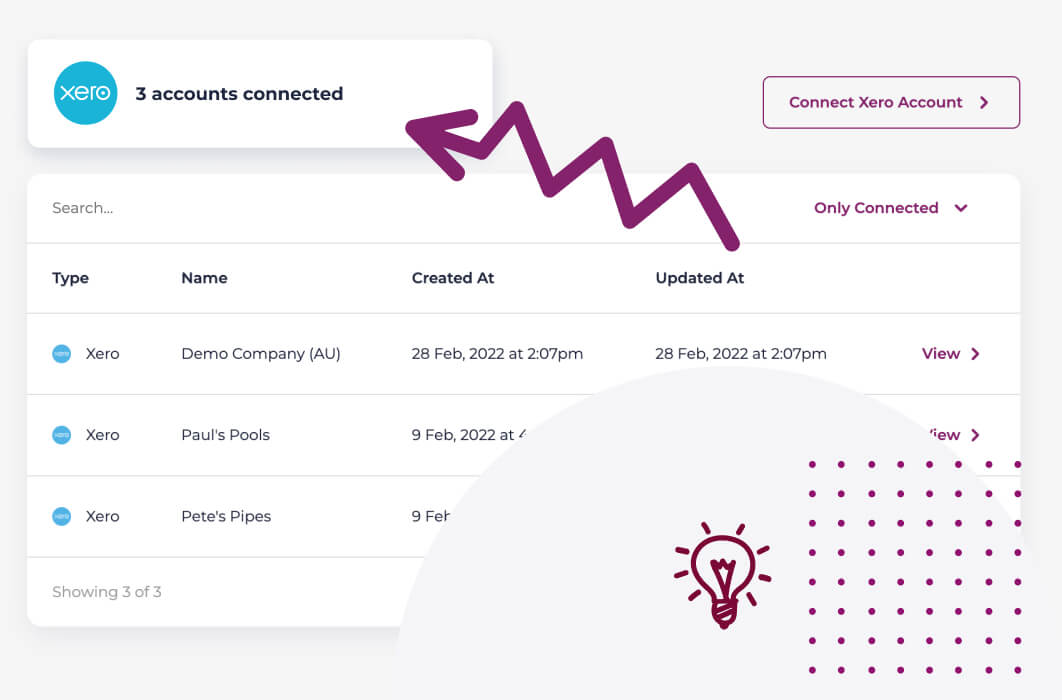
- One Worknice account can connect several Xero organisations, and customers have connected as many as five.
01. Integration connection control
A feature so new and innovative we didn’t know what to call it. Now you can control the XERO integration at the person level, not just the account level.
02. Integrate multiple XERO payroll accounts at once
Have more than 1 XERO account? Pull all your people and data together by connecting to multiple XERO payroll accounts.
03. Automation rules
Set up the automation that suits you. Tell Worknice how to sync your data moving forward.
What does the Worknice Xero integration sync?
The Worknice Xero integration syncs employee records between Worknice and Xero Payroll, field by field. It imports your existing employees, sends new hires to Xero with personal, bank, TFN, and super details, and brings later Xero changes back. It also shows live leave balances and sends approved leave to Xero when payroll is ready.
Connecting HR to payroll should not mean “sync everything, or sync nothing”. As Worknice’s client base grew, it became clear that teams needed more flexibility in how the Xero connection works. So the integration was rebuilt around three controls. They are connection control for each person, several Xero accounts at once, and rules for how new records sync.
Under those controls sit the four surfaces the integration covers:
Setup and import: you connect Xero, choose which employees to import, and their personal and payroll data arrives in Worknice. The help centre’s advice is to back up your payroll data first.
New hires: the employee enters their details once in Worknice, and the integration creates them in Xero ready for payroll to finish.
Ongoing records: after a new hire is created, Xero leads for personal, bank, TFN, and super details, and Worknice updates to match.
Leave: employees request leave against Xero balances, managers approve it, and an account owner sends it to Xero in a batch through the dedicated Xero leave app.
Why does Xero stay the source of truth after a new hire is set up?
Xero stays the source of truth because payroll runs there, and payroll staff correct pay details there. So Worknice sends a new hire’s details once, then treats Xero as the record for personal, bank, TFN, and super data. Worknice is HRIS-only by design, so it never runs a second payroll that could disagree with Xero.
The direction matters more than it looks. Suppose an employee changes banks a month after starting and tells payroll, who updates Xero. If Worknice kept pushing its older copy, the next sync could overwrite the new account, and the pay would go to the wrong place. Instead, the change in Xero flows back and updates Worknice.
There is a compliance reason too, because tax and super depend on these details. According to the ATO, new employees complete a TFN declaration and a super standard choice form. Those forms tell you how much tax to withhold and where to pay super. According to the Fair Work Ombudsman, employers must keep time and wages records for 7 years. Keeping the pay version of those details in Xero gives you one record to defend.
For the same reason, leave balances come from Xero rather than being calculated twice. Xero also works out the hours for each leave request from the employee’s pay template, rather than Worknice applying its work patterns.
What can Xero do on its own, and where does the integration stop?
Xero Payroll runs pay, super, and Single Touch Payroll reporting, and Xero Me gives employees payslips and leave requests on their phone. The integration does not replace any of that. It also stops short of a complete payroll setup, so payroll still finishes several items in Xero before the first pay run.
According to Xero, employees can use Xero Me to fill out timesheets, check payslips, request leave, and claim expenses. For many small teams, that covers day-to-day payroll self-service well. Worknice adds the HR work around it, such as onboarding paperwork, documents, approvals, and an organisation-wide view of who is away.
Knowing the limits in advance saves surprises on the first pay run:
Profile completion: the Worknice help centre lists the pay template, HECS debt, leave types, and ATO filing as steps the integration cannot do, so check each new profile in Xero.
Unanswered Xero leave: leave that nobody in Xero has answered yet is deliberately not imported. Answering it in Xero creates a second application with a new ID, so an imported copy could never be corrected.
Archiving is permanent: an archived integration cannot be restored, and archiving a leave app removes its leave records from Worknice. So get approved leave into Xero first, then archive.
Leave history: the leave app’s first sync brings across the last 12 months of leave, and older leave stays in Xero.
Older connections: on a Xero integration connected before the leave app, approved leave does not reach Xero by itself. The help centre’s upgrade guide moves you across in one sitting, and its order matters: get outstanding leave into Xero, then archive the old app.
How does the sync work, field by field?
The sync links each Worknice person to one Xero employee, then moves each kind of data in a set direction. Personal, bank, TFN, and super details go to Xero for a new hire and come back from Xero after that. Leave balances arrive live from Xero, and approved leave goes to Xero only when payroll submits it.
| Data | Direction | When | Who acts |
|---|---|---|---|
| Existing employees | Xero to Worknice | When you first connect | An admin chooses which employees to import |
| Personal details | To Xero, then back | New hire, then each sync | Employee once, then payroll in Xero |
| Bank account | To Xero, then back | New hire, then each sync | Employee once, then payroll in Xero |
| TFN declaration | To Xero, then back | New hire, then each sync | Employee once, then payroll in Xero |
| Superannuation | To Xero, then back | New hire, then each sync | Employee once, then payroll in Xero |
| Leave balances | Xero to Worknice | Live | Nobody, because employees see them in Worknice |
| Approved leave | Worknice to Xero | When an account owner submits the batch | An account owner opens the app, ticks requests, and selects Submit to Xero |
| Leave entered or changed in Xero | Xero to Worknice | On the next sync | Payroll, in Xero |
| Pay template, HECS debt, leave types, ATO filing | Not synced | Before the first pay run | Payroll completes them in Xero |
Which leave details catch people out?
Three details catch people out. Marking a leave request as processed by hand does not send it to Xero, because only the integration moves leave. In addition, a balance hidden in Xero shows no balance in Worknice, although the employee can still request that leave. Finally, leave that started in Xero is read-only in Worknice and carries a Xero logo, so changes to it happen in Xero.
Leave runs through the dedicated Xero leave app, installed from the Marketplace tab under Apps, separately from the payroll connection. Because approved leave waits there until someone submits it, payroll can send each request as it is approved or hold the batch until just before the pay run. For the leave workflow end to end, see how Australian teams add HR on top of Xero Payroll.
How does connection control decide who syncs to Xero?
Connection control links each Worknice person to their own Xero record, instead of syncing a whole account at once. You can therefore leave someone out of payroll entirely, or link two records that do not share an email address. It is no longer a case of “sync everything, or sync nothing” for a workforce that keeps getting more varied.
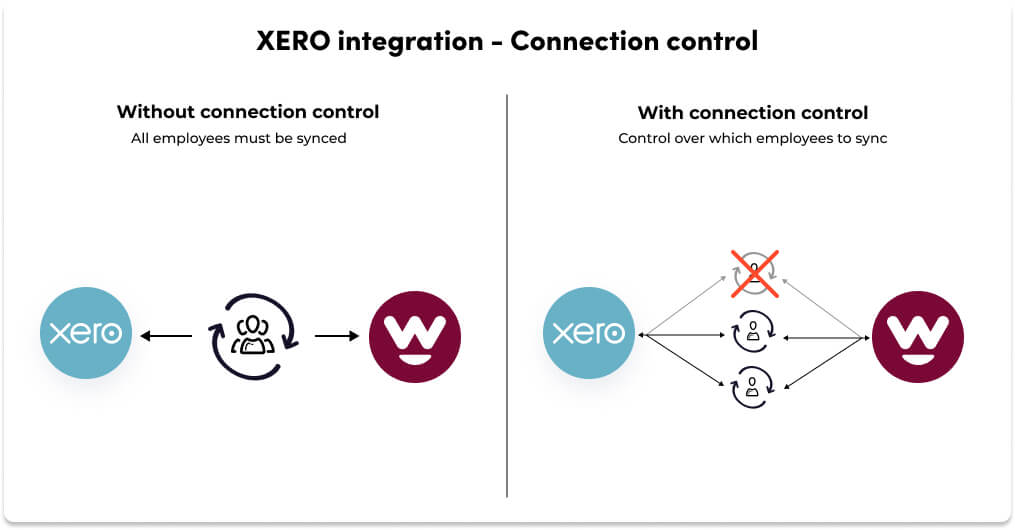
Imagine you onboard Joe Bloggs as a volunteer. You still need his address, his signature on your policies, and maybe a copy of his licence. However, Joe will never be paid, so he should not appear in Xero. Because Joe has his own connection, you tell Worknice not to create a payroll record, and the recurring sync ignores him from then on.
The same control solves a quieter problem with matching. Sometimes the two records belong to the same person but carry different emails, typically a personal one in payroll and a work one in HR. Connection control lets you link those two records by hand, so the sync treats them as one employee.
That person-level choice matters more as you add contractors, unpaid workers, and board members. Each one can have a full HR record in Worknice, with documents and emergency contacts, and no payroll record at all.
Can Worknice connect to more than one Xero organisation?
Yes, one Worknice account can connect to several Xero payroll organisations at once, and customers have connected as many as five. All the connections stay live and ready to sync, so nobody switches between them by hand. Each employee syncs to the Xero organisation that pays them, so every entity’s payroll stays separate.
This suits groups with separate companies, a business that grew by acquisition, or a charity running a distinct payroll file. HR gets one directory, one leave calendar, and one set of reports, while payroll keeps working in each Xero organisation as before. If you find yourself connecting many more than five, it may be worth asking whether every one still needs to exist.
Every connection keeps the same two-way behaviour described above. Occasionally one person is paid by two entities, such as an executive working across a group. Worknice can sync that single person to more than one payroll, keeping both records up to date.
The wider case for running several entities in one HRIS is in the multi-entity HRIS guide.
What happens when a new person turns up in Xero or Worknice?
When Xero holds someone who is not yet linked in Worknice, they appear on the integration as a remote record waiting for a decision. An account owner can match them to an existing person, import them into Worknice, or leave them alone. Going the other way, you export Worknice people to Xero only when they should be paid.
In 2022 these choices were called automation rules, and the idea has not changed: nobody crosses between HR and payroll without a rule or a person deciding. You manage it from the integration under Apps, on the Installed tab, or from the Settings tab on a person’s profile. Depending on the integration, an account owner can also turn on automatic matching by email address or employee code.
Which approach suits you depends on your workforce. If your team is mostly permanent paid employees, you will likely match on email and export each new hire to Xero as part of onboarding. On the other hand, a workforce with unpaid volunteers, contractors, or overseas entities usually wants an admin to decide each time. That gives you the chance to say “do not add this person to Xero”.
The reverse case happens too. For instance, you might keep an external service provider in Xero who should never appear in your HRIS. Leaving that remote record unmatched means they never arrive in Worknice without a decision. However you want the integration to work, you keep the control.
Who should use the Worknice Xero integration, and who should stay on Xero alone?
Use the Worknice Xero integration if you are keeping Xero for payroll and need HR records, onboarding, and approvals around it. Stay on Xero alone if Xero Me covers your payslips and leave, you run one organisation, and onboarding is simple. For that team, an HRIS adds cost without much benefit.
Add Worknice when two or more of these are true:
- You onboard regularly and want new starters to enter their own payroll details.
- Volunteers, contractors, or board members need an HR record but no pay.
- You run more than one Xero organisation and want one view of everyone.
- You want leave approved in one place and sent to Xero when payroll is ready.
Equally, keep change management in mind. Accounts teams often prefer to update payroll details in Xero, and they can stay there, because those changes flow back. HR, managers, and employees work in Worknice, which saves a lot of headache in the rollout.
If you are still choosing HR software for Xero, start with how to choose an HRIS that integrates with Xero.
Frequently asked questions
Does Worknice offer a Xero payroll integration?
Yes, Worknice has a direct integration with Xero Payroll. It imports existing employees, creates new hires in Xero with personal, bank, TFN, and super details, and brings later Xero changes back. Leave balances sync live, and approved leave goes to Xero through the Xero leave app when payroll submits it. Xero stays the source of truth for pay.
Is the Worknice Xero integration two-way?
Yes, but each field moves in a set direction. New hire details go from Worknice to Xero once. After that, changes to personal, bank, TFN, and super details made in Xero flow back into Worknice. Leave balances come from Xero, approved leave goes to Xero, and leave entered or changed in Xero comes back on the next sync.
What does payroll still set up in Xero?
The Worknice help centre lists four things the integration cannot complete: the pay template, HECS debt, leave types, and filing to the ATO. Payroll should check each new profile in Xero and finish those items before the first pay run. Everything the employee entered during onboarding arrives in Xero already filled in.
Can I keep volunteers or contractors out of Xero?
Yes, connection control handles that. It links each person to Xero individually, so you can mark a volunteer, contractor, or board member as not connected. Worknice then holds their HR record, documents, and emergency contacts without creating a payroll record, and the recurring sync ignores them. The same control links records that do not share an email.
Can one Worknice account connect several Xero organisations?
Yes, it can. One Worknice account can stay connected to several Xero payroll organisations at the same time, and customers have connected as many as five. Each employee syncs to the organisation that pays them, so each payroll stays separate. Meanwhile, HR sees everyone in one directory, one leave calendar, and one set of reports.
About the author
Graham Martin is a co-founder of Worknice, the Australian HRIS for mid-to-large organisations. He works with HR and payroll teams on connecting HR to Xero, MYOB AccountRight, MicrOpay, KeyPay, Employment Hero Payroll, and ELMO Payroll. He writes about keeping people data clean and payroll-ready.
Related reading
- Worknice payroll integration overview: how Worknice connects to each payroll system it supports, and what stays with payroll.
- How Australian teams add HR on top of Xero Payroll: the Worknice and Xero integration in depth, including leave approval.
- Xero HR software: how to choose an HRIS for Xero: what to ask any vendor about its Xero integration.
- MYOB AccountRight onboarding and employee sync: the same field-by-field view for MYOB AccountRight.
Sources
- Worknice Help Center. “Xero.” Retrieved 11 October 2026. https://help.worknice.com/article/xero
- Worknice Help Center. “Upgrading to the Xero leave app.” Retrieved 11 October 2026. https://help.worknice.com/article/upgrading-to-the-xero-leave-app
- Worknice Help Center. “People connections.” Retrieved 11 October 2026. https://help.worknice.com/article/people-connections
- Xero. “Xero Me: the Payroll Employee Self-Service App.” Retrieved 11 October 2026. https://www.xero.com/au/xero-me/
- Australian Taxation Office. “Hiring a new worker.” Page last updated 27 June 2026, retrieved 11 October 2026. https://www.ato.gov.au/businesses-and-organisations/hiring-and-paying-your-workers/engaging-a-worker/hiring-a-new-worker
- Fair Work Ombudsman. “Record-keeping.” Page last updated 28 August 2026, retrieved 11 October 2026. https://www.fairwork.gov.au/pay-and-wages/paying-wages/record-keeping
- Australian Taxation Office. “Single Touch Payroll.” Retrieved 11 October 2026. https://www.ato.gov.au/businesses-and-organisations/hiring-and-paying-your-workers/single-touch-payroll
Never set up a pay template again
Worknice set’s up new hires in XERO payroll for you – including pay templates. Check out this case study to see how it can help you save time while creating a smoother employee experience.
Case Study